Loading
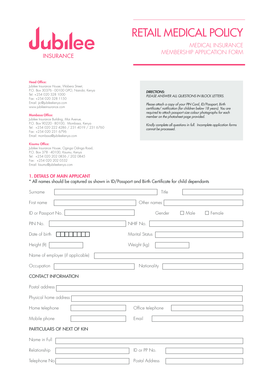
Get Download Jcare Application Form - Jubilee Insurance
How it works
-

Open form follow the instructions
-

Easily sign the form with your finger
-

Send filled & signed form or save
How to fill out the Download JCARE Application Form - Jubilee Insurance online
Completing the Download JCARE Application Form for Jubilee Insurance can seem daunting, but with this guide, you will find clear and supportive instructions to navigate each section of the form confidently. This document aims to assist users of all experiences in completing the application effectively.
Follow the steps to successfully fill out your application form.
- Click the 'Get Form' button to obtain the Download JCARE Application Form and open it in your preferred format.
- Begin with the details of the main applicant. Ensure all names match those on identification documents. Fill in your surname, title, first name, ID or passport number, other names, gender, PIN number, NHIF number, date of birth, height, weight, occupation, and nationality.
- Provide contact information. Include your postal address, physical home address, home and office telephone numbers, mobile phone number, and email address.
- Fill in the particulars of the next of kin, providing their full name, relationship to you, ID or passport number, and telephone number. Also, include their postal address.
- List the beneficiaries for personal accident cover. Include their full name, relationship, ID or passport number, telephone number, and postal address.
- For dependents' details, indicate the names, titles, gender, date of birth, weight, height, relationship to you, and occupation for up to five dependents.
- Select the plan details based on your preferred coverage. Indicate plan limits, outpatient coverage, maternity, personal accident, optical, and dental options as applicable by ticking the required boxes.
- Complete the section on previous membership by providing names of schemes, membership durations, and responding to questions about prior claims or any medical exclusions.
- Fill in the confidential medical history section. Indicate any illnesses and treatments for yourself and dependents, marking 'Yes' or 'No' as required.
- Provide details of surgeries and hospital admissions, including dates, diagnoses, and a description of procedures for yourself and dependents.
- Read through the general exclusions and ensure you understand the limitations of the policy.
- Complete the declaration section by signing and dating the application. Acknowledge that all information is accurate and agree to the terms outlined in the application.
- Finally, save changes to the completed application. You may download, print, or share the document for submission.
Complete your Download JCARE Application Form online today to ensure you receive the coverage you need.
The Policy, at the option of the Policy Owner, may be rendered Paid – Up for Cash Value, such that, the Benefit Assured and all supplementary benefits would be reduced of all value and no further deductions of monthly Cover Charges would occur from the Cash Value in the Unit Account of the Policy.