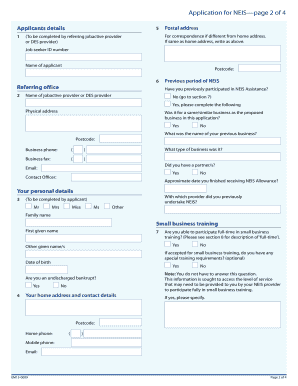
New Enterprise Incentive Scheme (NEIS) Application for NEIS NEIS Assistance Your information and privacy NEIS assists eligible unemployed people to start new, viable small businesses. If you are a.
Open form follow the instructions
Easily sign the form with your finger
Send filled & signed form or save
How to fill out the Download The NEIS Application Form - Sarina Russo online
This guide provides comprehensive instructions for completing the Download The NEIS Application Form - Sarina Russo online. Whether you are familiar with digital forms or new to the process, this step-by-step guide will help you successfully navigate the components of the application.
Follow the steps to complete your NEIS application form online.
- Click the ‘Get Form’ button to download the application form. Open the form using your preferred PDF viewer or editor.
- Begin by completing the 'Applicant's Details' section. Here, you will provide your name, job seeker ID number, postal address for correspondence, and contact information including phone and email.
- In the 'Previous Period of NEIS' section, indicate if you have participated in NEIS Assistance before. If yes, provide details of your previous business and check whether it was for a similar business.
- Next, fill out 'Your Personal Details,' ensuring to answer questions about your age, bankruptcy status, and ability to participate in small business training.
- Proceed to the 'Your Proposed Business' section. Answer questions regarding your business operation status, compliance with laws, and provide a description of your proposed business.
- In 'Your Declaration,' certify that the information provided is accurate and complete. Sign and date the section as required.
- After reviewing your responses, save any changes made to the form. Options typically include downloading, printing, or sharing the completed application.
Begin your application process today by completing the NEIS Application Form online.
Experience a faster way to fill out and sign forms on the web. Access the most extensive library of templates available.
Related content
School enrollment was positively associated with social capital for young ... Impacts are...
commercial service can apply to the Austra- lian Broadcasting ... forms, part of Senator...
Get answers to your most pressing questions about US Legal Forms API.
How do I find header information?
Click File > Properties. Header information appears in the Internet headers box.
How can I trace the location of an email sender?
In conclusion, tracing an email sender's location can be done by analyzing the email's headers and message routing data, using a GeoIP Database to locate the sender's IP address, searching by ISP or webmail provider, using reverse email lookup tools, or checking the sender's social media accounts.
How do I get a message header in message trace?
How to read email full headers Open the email you want to check the headers for. Next to Reply , click More Show original. Copy the text on the page. Open the Message header tool. In "Paste email header here," paste your header. Click Analyze the header above.
How do I find the sender of an email header?
Determine who sent the email by reading the "Received from" tags starting at the bottom. Because email headers are listed in reverse chronological order, the bottom header will provide you with information about the original sender.
Can you see where an email was sent from in Outlook?
An email message internet header provides a list of technical details about the message, such as who sent it, the software used to compose it, and the email servers that it passed through on its way to the recipient.
Can you tell where an email was sent from?
Open the email header as we showed above (Open Email>More>Show Original) Find the Received line. This will probably be the second line in the email header after Delivered To: You'll find the IP address of the email server that sent the email as Original IP or X Originating IP.
Does Gmail reveal your IP address?
Google/Gmail strips the originating IP address (among other things) from outgoing messages - so the receiver cannot see the IP to indicate where you are, or more correctly, where the email originated from.
How do you find out who is behind an email address?
8 Ways to Check Email Address Owner Information 1 CRM Auto-enrichment Tools. 2 Google Search. 3 Browser Extension Lookup. 4 Email Verification Services. 5 Reverse Email Lookup. 6 Social Media. 7 Trace the IP Address. 8 Contact the Company Associated With the Main Domain.
Use professional pre-built templates to fill in and sign documents online faster. Get access to thousands of forms.
If you believe that this page should be taken down, please follow our DMCA take down process here.