Loading
Get 0201384979797
How it works
-

Open form follow the instructions
-

Easily sign the form with your finger
-

Send filled & signed form or save
How to fill out the 0201384979797 online
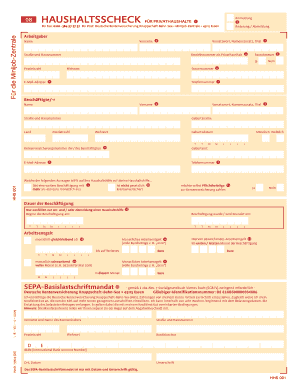
This guide provides a clear and supportive approach to completing the 0201384979797 form online. By following these steps, users can efficiently navigate the various sections and ensure their form is filled out correctly.
Follow the steps to complete the 0201384979797 form online.
- Press the ‘Get Form’ button to obtain the form and access it in the online editor.
- Identify whether you are registering a new employee, changing details, or canceling any registration. Mark the appropriate option on the form.
- Fill in the employer's details, including first name, last name, title, and any prefixes in the designated fields.
- Enter your business number if you have one; if not, a new one will be created for you.
- Specifically indicate if you choose to apply the flat tax rate; select 'yes' for the flat rate of 2% on the total salary or 'no' to adhere to regular tax rates.
- If you selected 'yes' for the flat tax, enter your tax number from your last tax assessment. This step is not necessary if you chose 'no'.
- Provide your email address and phone number for quicker communication, though these fields are optional.
- Fill out the details of the employee, including their first name, last name, date of birth, and social security number, which can be found on their social security card.
- Indicate if your employee has another job that pays more than 450 Euros; check 'yes' if applicable.
- Confirm whether the employee is not legally insured; check 'yes' if they are not.
- Decide if the employee wishes to voluntarily pay pension contributions. Select 'yes' or 'no' based on their preference.
- Specify the duration of employment by filling in the start date and, if applicable, the end date of employment.
- Indicate if the monthly wage remains the same; enter the fixed amount in the designated field.
- If the pay varies each month, check the relevant option and report the payment for the current month.
- If the employee's pay was different in the first or last month of employment, provide that figure in the appropriate field.
- Complete the SEPA direct debit mandate, providing all necessary bank account details, and ensure it is signed and dated for validity.
- Once all sections are filled out, review your entries for accuracy. After confirming that everything is correct, save your changes, download a copy for your records, or submit the form as required.
Start filling out your forms online to simplify your document management.
Related links form
0:14 5:18 Trace tables tutorial GCSE Computer Science - YouTube YouTube Start of suggested clip End of suggested clip So I'll start by writing the the variable names so we've got terms which is the first one. And we'veMoreSo I'll start by writing the the variable names so we've got terms which is the first one. And we've got X which is the next variable. And we'll put outputs.
Industry-leading security and compliance
US Legal Forms protects your data by complying with industry-specific security standards.
-
In businnes since 199725+ years providing professional legal documents.
-
Accredited businessGuarantees that a business meets BBB accreditation standards in the US and Canada.
-
Secured by BraintreeValidated Level 1 PCI DSS compliant payment gateway that accepts most major credit and debit card brands from across the globe.