Loading
Get Download The Medicare Advantage General ... - Anthem
How it works
-

Open form follow the instructions
-

Easily sign the form with your finger
-

Send filled & signed form or save
How to fill out the Download The Medicare Advantage General ... - Anthem online
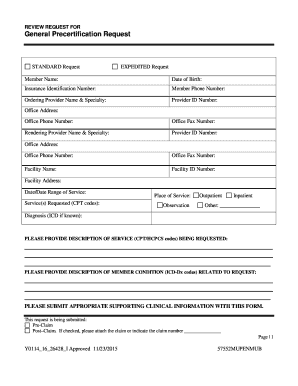
This guide provides a step-by-step process for filling out the Download The Medicare Advantage General ... - Anthem form online. By following these instructions, users can ensure that they complete the form accurately and efficiently.
Follow the steps to successfully complete your form.
- Click the ‘Get Form’ button to access the form and open it in the editor.
- Begin by entering the member’s name, date of birth, and insurance identification number in the designated fields.
- Provide the member's phone number, along with the ordering provider's name and specialty.
- Enter the provider's ID number, office address, phone number, and fax number in their respective fields.
- Next, complete the fields for the rendering provider's name, specialty, ID number, office address, phone number, and fax number.
- Fill in the facility name, ID number, and address where the service will take place.
- Specify the date or date range of the service being requested along with the service codes (CPT codes).
- Indicate the place of service as either observation, outpatient, inpatient, or another option.
- Provide the diagnosis, including ICD codes if known, related to the request.
- Describe the service being requested, including accurate CPT or HCPCS codes.
- Include a brief description of the member's condition related to the request along with any known ICD diagnosis codes.
- Attach any necessary supporting clinical information to this form to substantiate the request.
- Select whether the request is a pre-claim or post-claim submission. If it is a post-claim request, ensure to attach the corresponding claim or indicate the claim number.
- Complete the attestation section by printing the name and title of the provider or representative submitting the form.
- Finally, make sure all fields are filled out correctly before submitting the form. Users can save changes, download, print, or share the form as needed.
Start filling out your form online today for a smoother process.
Anthem MediBlue PPO is one type of Medicare Advantage plan that combines the benefits of a Medicare Advantage plan with the choice of a PPO. ... You receive all the benefits of the Medicare Advantage plan and can choose from our complete network of doctors and facilities.