N this information. Thank you for taking the time to fill in this form. We appreciate your co-operation in answering these questions and returning the form to the employee for return to Centrelink within 14 days of being given this form. All the information contained in, or attached to, this report may be subject to release under the Freedom of Information Act 1982 (the FOI Act) to any person(s) (including those named in either the report or its attachments). If you want any of this information .
Loading

Open form follow the instructions

Easily sign the form with your finger

Send filled & signed form or save
How to fill out the AU Employment Separation Certificate online
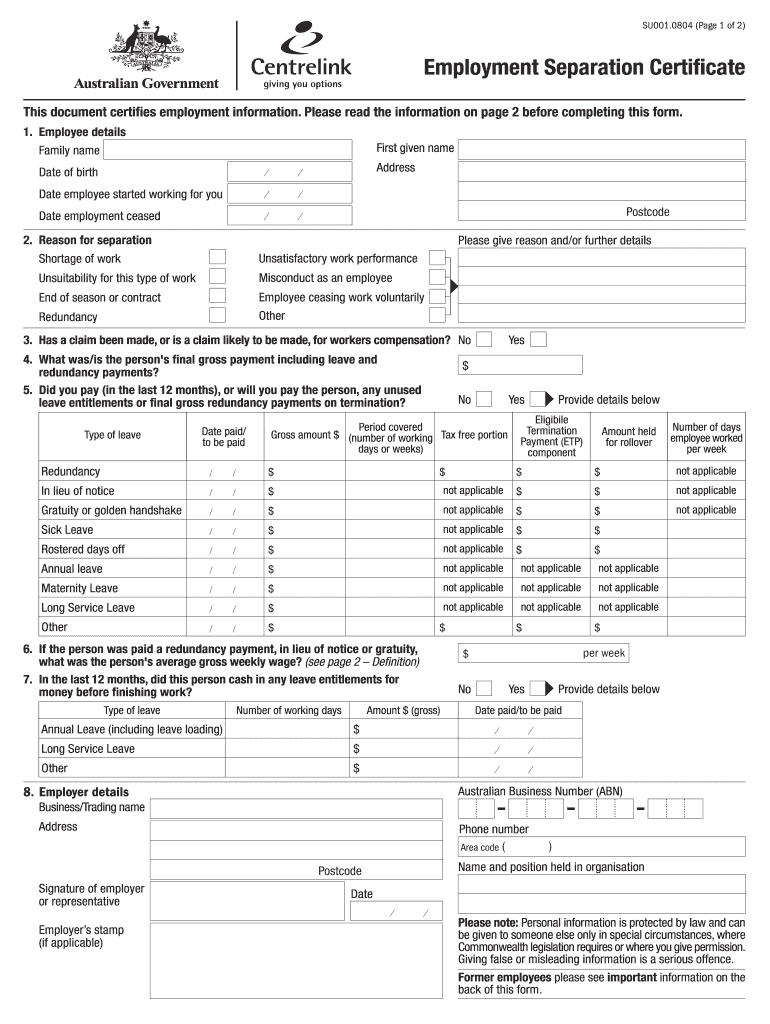
This guide provides clear and step-by-step instructions for completing the AU Employment Separation Certificate online. The certificate is essential for certifying employment details and is often required for income support claims.
Follow the steps to successfully complete the AU Employment Separation Certificate online.
- Click ‘Get Form’ button to obtain the form and open it in the online editor.
- Begin filling out the 'Employee details' section. Enter the employee's family name, first given name, date of birth, and address. Also, specify the date the employee started working and the date their employment ceased including the postcode.
- In the 'Reason for separation' section, select the appropriate reason for separation from the provided options such as shortage of work or misconduct. You may provide additional details as necessary.
- Answer whether a claim has been made or is likely to be made for workers compensation by selecting 'Yes' or 'No'.
- Enter the final gross payment amount that the employee received, including any leave or redundancy payments.
- Indicate if any unused leave entitlements were paid in the last 12 months or will be, selecting 'Yes' or 'No'. If applicable, provide details on the types and amounts of leave.
- If redundancy payment was given, specify the person's average gross weekly wage as required.
- If the employee cashed in any leave entitlements before finishing work in the last 12 months, provide details including type, number of working days, and the gross amount.
- Complete the 'Employer details' section by entering the business/trading name, address, and phone number. Ensure to provide the signature of the employer or representative, name, position held, and date of completion.
- After inputting all necessary information, review the form for completeness. Save changes, download, print, or share the form according to your needs.
Complete your Employment Separation Certificate online today for efficient processing.
Experience a faster way to fill out and sign forms on the web. Access the most extensive library of templates available.
Related content
(c) A certification is to be addressed to each individual eligible employee and must be...
This certificate acts as a formal record of an employee's departure from a company...
The document is divided into ten Parts, and within seven of these Parts there are several...
Get answers to your most pressing questions about US Legal Forms API.
Is separation the same as termination?
Separation and termination are similar, but they are not identical terms. Separation refers to any scenario where an employee leaves a job, whether voluntarily or involuntarily. Termination specifically refers to a situation where the employer ends the employment relationship. To navigate this process smoothly, consider using our platform to obtain the AU Employment Separation Certificate, ensuring you have all necessary documentation for your future endeavors.
Does a termination letter mean you were fired?
A termination letter does indicate the end of employment, but it does not always mean that you were fired. This letter can result from various circumstances, such as layoffs or mutual agreements. Regardless of the reason, having an AU Employment Separation Certificate can clarify your employment details for future job applications.
What is a work separation letter?
A work separation letter is a document that confirms that an employee has left a company. This letter can be issued by either the employer or employee. It often includes information about the employee’s role, the reason for departure, and any relevant dates. Additionally, obtaining an AU Employment Separation Certificate can strengthen your job search by providing verification of your work history.
What is a separation letter from your employer?
A separation letter from your employer is a formal document that outlines the end of your employment. It typically details your position, the reason for separation, and the final date of employment. This letter is vital when applying for new jobs as it serves as proof of your employment history. You may need to request an AU Employment Separation Certificate to accompany this letter for a complete employment record.
How do I ask for employment certification?
To request employment certification, begin by crafting a concise email to your employer or HR. Include your name, position, and the employment duration in your request. Make sure to specify that you would like the AU Employment Separation Certificate for official verification.
How to ask for a certificate of employment?
When asking for a certificate of employment, start by reaching out to your HR department or direct supervisor. Politely state your request and why you need the certificate. Make sure to ask for the AU Employment Separation Certificate explicitly, as it contains all necessary employment details.
How to write an email requesting a certificate of employment?
When composing an email for a certificate of employment, be direct and specific. Mention the certificate's purpose and supply your full name, position, and the period you were employed. Ensure you are courteous and express your appreciation for their help in issuing the AU Employment Separation Certificate.
How do I write an email asking for a certificate?
To write an email requesting an AU Employment Separation Certificate, start with a polite greeting. Clearly state the purpose of your email by mentioning your request for the certificate and include any relevant details such as your employment dates. It's helpful to thank the recipient in advance for their assistance.
How do you start a separation letter?
You should start a separation letter with a formal salutation, addressing the recipient directly. Follow this with a clear statement that indicates the purpose of the letter, ensuring transparency. As you draft it, remember to include relevant information about the AU Employment Separation Certificate, which facilitates easier transitions for the employee.
What is an example of a letter of separation?
An example of a letter of separation includes essential details such as the employee's name, the position, the separation date, and any pertinent reasons. It often includes a closing note expressing gratitude for their contributions. Also, mention the importance of the AU Employment Separation Certificate, which acts as essential documentation for future employment opportunities.
Use professional pre-built templates to fill in and sign documents online faster. Get access to thousands of forms.
If you believe that this page should be taken down, please follow our DMCA take down process here.