We use cookies to improve security, personalize the user experience, enhance our marketing activities (including cooperating with our marketing partners) and for other business use.
Click "here" to read our Cookie Policy. By clicking "Accept" you agree to the use of cookies. Read less
Read more
Accept
Loading
Form preview
  • US Legal Forms
  • Form Library
  • More Forms
  • More Uncategorized Forms
  • Two Week Look Ahead Schedule

Get Two Week Look Ahead Schedule

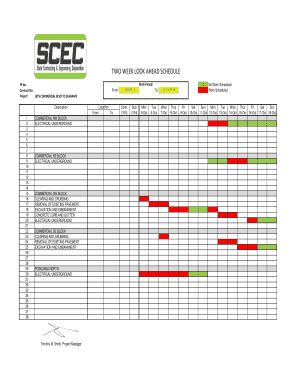
TWO WEEK LOOK AHEAD SCHEDULE Work Period: FP No: Contract No: Project: LBTS COMMERCIAL BLVD TO SEAGRAPE From: Location Description From 1 2 3 4 5 6 7 8 9 10 11 12 13 14 15 16 17 18 19 20 21 22 23.

How it works

  1. Open form

    Open form follow the instructions

  2. Easily sign form

    Easily sign the form with your finger

  3. Share form

    Send filled & signed form or save

How to fill out the TWO WEEK LOOK AHEAD SCHEDULE online

Filling out the Two Week Look Ahead Schedule is essential for effective project management. This guide provides clear, step-by-step instructions to help you complete this document accurately and efficiently online.

Follow the steps to complete your schedule effectively.

  1. Press the ‘Get Form’ button to access the Two Week Look Ahead Schedule and open it in your chosen editing platform.
  2. Begin by entering your work period. Clearly specify the dates that the schedule covers in the designated fields.
  3. Next, input the FP number and contract number in the provided sections to reference the specific project.
  4. Indicate the project description, in this case, 'LBTS Commercial Blvd to Seagrape,' to ensure clarity about the project’s context.
  5. Fill in the location section with the relevant site details where the work is planned to take place.
  6. In the 'From' section, detail the specific activities scheduled to start on the specified dates. For clarity, list each task in the consecutive rows available.
  7. In the 'To' section, indicate the end dates for the work activities, ensuring they align with the respective tasks listed.
  8. Review the 'Contr. (Y/N)' and 'Sub (Y/N)' columns to specify whether contractors or subcontractors will be involved in each task, marking 'Y' for yes or 'N' for no.
  9. Next, allocate the work scheduled for each day of the week. Use the columns to record the amount of work planned for each date, ensuring to mark days with no scheduled work appropriately.
  10. After filling out all relevant fields, take a moment to review the entire document for any errors or omissions before saving.
  11. Finally, save your changes, then download, print, or share the completed Two Week Look Ahead Schedule as needed.

Complete your documents online today to stay organized and on schedule.

Get form

Experience a faster way to fill out and sign forms on the web. Access the most extensive library of templates available.
Get form

Related content

Project Schedule - Los Angeles County Public Works
Two Week Look Ahead: The following construction activities have been scheduled for the...
Learn more
Project Updates and Two Week Look-Ahead Schedules...
Project Name, Project Manager, Status. Art Installations, UTM K. Ngo, Design. RLE...
Learn more
Cover date - Wikipedia
The cover date of a periodical publication such as a magazine or comic book is the date...
Learn more

Related links form

North Suburban Emergency Communication Shift Supervisor Evaluation Northwest Neurology and Electrodiagnostic Center Epworth Sleepiness Scale NSA Athletic Waiver and Release Of Liability Softball Nutrena Club Support Program Redemption Form

Questions & Answers

Get answers to your most pressing questions about US Legal Forms API.

Contact support

3 week-look-ahead-schedule. Created in Excel, the 3 week look ahead schedule list all just completed, in progress, and upcoming activities for last week with actual start and completion dates, this week and the next 2 weeks. All significant activities and resources should be included.

You can use this to show look-ahead views in MS-Project. For example you can show only tasks due to start after today but within 28 days by setting a custom filter on the Start column: in MS-Project 2016, click on the drop-down, then select Filters Custom

A look ahead is a perspective of your present project but looking ahead for 2,4 or 6 weeks so you filter data date + 2 weeks for a 2 weeks look ahead, or apply your progress focus and establish it to the weeks you need and you will only focus on the work that must be done for the next 2 or 4 or 6 weeks.

Get This Form Now!

Use professional pre-built templates to fill in and sign documents online faster. Get access to thousands of forms.
Get form
If you believe that this page should be taken down, please follow our DMCA take down processhere.

Industry-leading security and compliance

US Legal Forms protects your data by complying with industry-specific security standards.
  • In businnes since 1997
    25+ years providing professional legal documents.
  • Accredited business
    Guarantees that a business meets BBB accreditation standards in the US and Canada.
  • Secured by Braintree
    Validated Level 1 PCI DSS compliant payment gateway that accepts most major credit and debit card brands from across the globe.
Get TWO WEEK LOOK AHEAD SCHEDULE
Get form
Form Packages
Adoption
Bankruptcy
Contractors
Divorce
Home Sales
Employment
Identity Theft
Incorporation
Landlord Tenant
Living Trust
Name Change
Personal Planning
Small Business
Wills & Estates
Packages A-Z
Form Categories
Affidavits
Bankruptcy
Bill of Sale
Corporate - LLC
Divorce
Employment
Identity Theft
Internet Technology
Landlord Tenant
Living Wills
Name Change
Power of Attorney
Real Estate
Small Estates
Wills
All Forms
Forms A-Z
Form Library
Customer Service
Terms of Service
Privacy Notice
Legal Hub
Content Takedown Policy
Bug Bounty Program
About Us
Help Portal
Legal Resources
Blog
Affiliates
Contact Us
Delete My Account
Site Map
Industries
Forms in Spanish
Localized Forms
State-specific Forms
Forms Kit
Legal Guides
Real Estate Handbook
All Guides
Prepared for You
Notarize
Incorporation services
Our Customers
For Consumers
For Small Business
For Attorneys
Our Sites
US Legal Forms
USLegal
FormsPass
pdfFiller
signNow
airSlate WorkFlow
DocHub
Instapage
Social Media
Call us now toll free:
+1 833 426 79 33
As seen in:
  • USA Today logo picture
  • CBC News logo picture
  • LA Times logo picture
  • The Washington Post logo picture
  • AP logo picture
  • Forbes logo picture
© Copyright 1997-2025
airSlate Legal Forms, Inc.
3720 Flowood Dr, Flowood, Mississippi 39232
Form Packages
Adoption
Bankruptcy
Contractors
Divorce
Home Sales
Employment
Identity Theft
Incorporation
Landlord Tenant
Living Trust
Name Change
Personal Planning
Small Business
Wills & Estates
Packages A-Z
Form Categories
Affidavits
Bankruptcy
Bill of Sale
Corporate - LLC
Divorce
Employment
Identity Theft
Internet Technology
Landlord Tenant
Living Wills
Name Change
Power of Attorney
Real Estate
Small Estates
Wills
All Forms
Forms A-Z
Form Library
Customer Service
Terms of Service
Privacy Notice
Legal Hub
Content Takedown Policy
Bug Bounty Program
About Us
Help Portal
Legal Resources
Blog
Affiliates
Contact Us
Delete My Account
Site Map
Industries
Forms in Spanish
Localized Forms
State-specific Forms
Forms Kit
Legal Guides
Real Estate Handbook
All Guides
Prepared for You
Notarize
Incorporation services
Our Customers
For Consumers
For Small Business
For Attorneys
Our Sites
US Legal Forms
USLegal
FormsPass
pdfFiller
signNow
airSlate WorkFlow
DocHub
Instapage
Social Media
Call us now toll free:
+1 833 426 79 33
As seen in:
  • USA Today logo picture
  • CBC News logo picture
  • LA Times logo picture
  • The Washington Post logo picture
  • AP logo picture
  • Forbes logo picture
© Copyright 1997-2025
airSlate Legal Forms, Inc.
3720 Flowood Dr, Flowood, Mississippi 39232