Loading
Form preview
  • US Legal Forms
  • Form Library
  • More Forms
  • More Uncategorized Forms
  • Wcjc Blackboard

Get Wcjc Blackboard

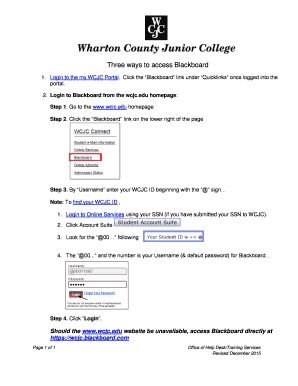
Three ways to access Blackboard 1. Login to the my WCJC Portal. Click the Blackboard link under Quicklinks once logged into the portal. 2. Login to Blackboard from the wcjc.edu homepage: Step 1. Go.

How it works

  1. Open form

    Open form follow the instructions

  2. Easily sign form

    Easily sign the form with your finger

  3. Share form

    Send filled & signed form or save

How to fill out the Wcjc Blackboard online

This guide provides a comprehensive overview of how to fill out the Wcjc Blackboard online. Whether you are a new user or need a refresher, follow these steps to complete the form efficiently.

Follow the steps to complete the Wcjc Blackboard form successfully.

  1. Click ‘Get Form’ button to obtain the form and open it in the editor.
  2. Access the Wcjc Blackboard by logging into the my WCJC Portal. Look for the 'Blackboard' link under 'Quicklinks' to proceed.
  3. If you prefer to login directly, go to the www.wcjc.edu homepage. Here, you will find the 'Blackboard' link at the lower right corner of the page.
  4. When prompted, enter your WCJC ID, beginning with the '@' sign, in the 'Username' field. To locate your WCJC ID, login to Online Services using your Social Security Number (if it has been submitted) and navigate to the Account Suite to find the '@00...' following.
  5. After entering your username, click the 'Login' button to access Blackboard.
  6. If the www.wcjc.edu website is temporarily unavailable, you can access Blackboard directly using the URL https://wcjc.blackboard.com.
  7. Once you have filled out the necessary information and completed your tasks on Blackboard, you can save your changes, download your work, print, or share the form as needed.

Complete your Wcjc Blackboard form online today for a seamless educational experience.

Get form

Experience a faster way to fill out and sign forms on the web. Access the most extensive library of templates available.
Get form

Related content

Wharton County Junior College (PDF) - US...
Oct 16, 2019 — College (WCJC or Recipient), in Wharton, Texas. ... technical issues I...
Learn more
Blackboard - Wharton County Junior College
WCJC Connect · Blackboard is a server based online Learning Management system (LMS) used...
Learn more

Related links form

USDA AD-334 2016 USDA AD-755 1995 USDA CCC-901 2016 USDA CCC-901 2014

Questions & Answers

Get answers to your most pressing questions about US Legal Forms API.

Contact support

0:13 2:00 How to Log in into Blackboard Learn page - YouTube YouTube Start of suggested clip End of suggested clip And your password. Click on the sign in button. In case you are unable to access your institution'sMoreAnd your password. Click on the sign in button. In case you are unable to access your institution's Blackburn learn site or if you are logged out of your account.

Find the “WCJC Students” network in your wireless network list and connect to it. A dialogue box will appear. Type the security key that was delivered to your WCJC Student e-Mail. Once the security key is validated, open your web browser, and click “Continue to the Internet”.

To obtain your WCJC Student e-Mail address log into WCJC Online Services and click on the Personal Information tab, then select View e-Mail address(es). Please allow 24 hours for your WCJC Student e-Mail address to be accessible before you try to login to the myWCJC Portal.

To Login to your WCJC Student e-Mail account, you must go through the MyWCJC Landing Page. To access the Landing Page, go to .wcjc.edu and click the MyWCJC link at the top right of the screen just below "Search WCJC". Your Password is your WCJC e-Mail password.

Blackboard classes become available on the first day of class, not before. If it is the first day of class and your class is not available when you log into Blackboard, please complete the Request for IT Support form or call (979) 532-6568.

Call us at 979-532-6568 or complete IT Support Request Form. The IT Help Desk is here to assist all faculty, staff, and students with technical issues related to: WCJC Email. BRIGHTSPACE Access.

A WCJC ID is generated when a student applies to WCJC. Each student receives an initial letter with instructions on logging into Online Services.. Once in Online Services, the student should click "Students & Financial Aid" then "WCJC Student Account Suite". The WCJC (User) ID is listed there.

For questions related to Admissions and Registration, please contact us at 979-532-6303 or registrar@wcjc.edu.

For a Forgot Password, enter your WCJC email username in the Reset your password window, then click submit. b. For a Forgot Username, enter your complete WCJC email address or one of your recovery email addresses in the Recover your username window, then click submit.

Login to Blackboard from the wcjc.edu homepage: Go to the .wcjc.edu homepage. Click the “Blackboard” link on the lower right of the page. By “Username” enter your WCJC ID beginning with the “@” sign… Note: To find your WCJC ID , Click “Login”.

Get This Form Now!

Use professional pre-built templates to fill in and sign documents online faster. Get access to thousands of forms.
Get form
If you believe that this page should be taken down, please follow our DMCA take down processhere.

Industry-leading security and compliance

US Legal Forms protects your data by complying with industry-specific security standards.
  • In businnes since 1997
    25+ years providing professional legal documents.
  • Accredited business
    Guarantees that a business meets BBB accreditation standards in the US and Canada.
  • Secured by Braintree
    Validated Level 1 PCI DSS compliant payment gateway that accepts most major credit and debit card brands from across the globe.
Get Wcjc Blackboard
Get form
  • Adoption
  • Bankruptcy
  • Contractors
  • Divorce
  • Home Sales
  • Employment
  • Identity Theft
  • Incorporation
  • Landlord Tenant
  • Living Trust
  • Name Change
  • Personal Planning
  • Small Business
  • Wills & Estates
  • Packages A-Z
  • Affidavits
  • Bankruptcy
  • Bill of Sale
  • Corporate - LLC
  • Divorce
  • Employment
  • Identity Theft
  • Internet Technology
  • Landlord Tenant
  • Living Wills
  • Name Change
  • Power of Attorney
  • Real Estate
  • Small Estates
  • Wills
  • All Forms
  • Forms A-Z
  • Form Library
  • Legal Hub
  • About Us
  • Help Portal
  • Legal Resources
  • Blog
  • Affiliates
  • Contact Us
  • Delete My Account
  • Site Map
  • Industries
  • Forms in Spanish
  • Localized Forms
  • State-specific Forms
  • Forms Kit
  • Real Estate Handbook
  • All Guides
  • Notarize
  • Incorporation services
  • For Consumers
  • For Small Business
  • For Attorneys
  • USLegal
  • FormsPass
  • pdfFiller
  • signNow
  • altaFlow
  • DocHub
  • Instapage
Form Packages
  • Adoption
  • Bankruptcy
  • Contractors
  • Divorce
  • Home Sales
  • Employment
  • Identity Theft
  • Incorporation
  • Landlord Tenant
  • Living Trust
  • Name Change
  • Personal Planning
  • Small Business
  • Wills & Estates
  • Packages A-Z
Form Categories
  • Affidavits
  • Bankruptcy
  • Bill of Sale
  • Corporate - LLC
  • Divorce
  • Employment
  • Identity Theft
  • Internet Technology
  • Landlord Tenant
  • Living Wills
  • Name Change
  • Power of Attorney
  • Real Estate
  • Small Estates
  • Wills
  • All Forms
  • Forms A-Z
  • Form Library
Customer Service
  • Legal Hub
  • About Us
  • Help Portal
  • Legal Resources
  • Blog
  • Affiliates
  • Contact Us
  • Delete My Account
  • Site Map
  • Industries
  • Forms in Spanish
  • Localized Forms
  • State-specific Forms
  • Forms Kit
Legal Guides
  • Real Estate Handbook
  • All Guides
Prepared for you
  • Notarize
  • Incorporation services
Our Customers
  • For Consumers
  • For Small Business
  • For Attorneys
Our Sites
  • USLegal
  • FormsPass
  • pdfFiller
  • signNow
  • altaFlow
  • DocHub
  • Instapage
Social Media
Call us now toll free:
+1 833 426 79 33
As seen in:
© Copyright 1999-2026 airSlate Legal Forms, Inc. 3720 Flowood Dr, Flowood, Mississippi 39232
  • Your Privacy Choices
  • Terms of Service
  • Privacy Notice
  • Content Takedown Policy
  • Bug Bounty Program