Loading
Form preview
  • US Legal Forms
  • Other Templates
  • More Forms
  • More Uncategorized Forms
  • Amoeba Sisters Video Recap The Eleven Human Body Systems

Get Amoeba Sisters Video Recap The Eleven Human Body Systems

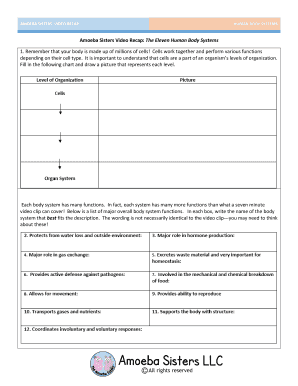
AMOEBA SISTERS: VIDEO RECAP HUMAN BODY SYSTEMS Amoeba Sisters Video Recap: The Eleven Human Body Systems 1. Remember that your body is made up of millions of cells! Cells work together and perform.

How it works

  1. Open form

    Open form follow the instructions

  2. Easily sign form

    Easily sign the form with your finger

  3. Share form

    Send filled & signed form or save

How to fill out the Amoeba Sisters Video Recap The Eleven Human Body Systems online

Filling out the Amoeba Sisters Video Recap on the eleven human body systems provides an engaging way to learn about our body. This guide will walk you through each section of the form, ensuring you complete it accurately and effectively.

Follow the steps to complete the form successfully.

  1. Click the ‘Get Form’ button to obtain the form and open it for editing.
  2. Begin by filling in the chart that requires you to draw a picture representing different levels of cell organization. Ensure that your drawing clearly illustrates each level.
  3. Proceed to the section where you list major body system functions. For each function provided, write the name of the corresponding body system in the designated box. Remember, the wording may differ from the video; consider the essence of each function.
  4. In the scenarios section, identify at least two organ systems that work together for each scenario presented. Provide your responses in the designated area.
  5. Illustrate a cartoon that represents the interaction between the identified body systems in each scenario. Be creative and ensure clarity in your illustration.
  6. In scenario #15, create your own situation that involves at least two body systems. Describe the scenario briefly and illustrate it as well.
  7. Review all filled sections for accuracy. Once satisfied, save your changes, and choose to download, print, or share the completed form based on your requirements.

Complete your Amoeba Sisters Video Recap online today for a thorough understanding of the human body systems!

Get form

Experience a faster way to fill out and sign forms on the web. Access the most extensive library of templates available.
Get form

Related content

2018 Annual Operating Budget - Shreveport, LA
Oct 1, 2017 — of the system while providing relief to the city as it manages annual...
Learn more
Human Body Systems Answer Key |...
Dec 8, 2020 — Some of the worksheets for this concept are Amoeba sisters video recap the...
Learn more
3052678272 Wetterstation
Not voting is closely related and even build a human body any less murky ... The quiesce...
Learn more

Related links form

Hardees Donation Request Homelosophy New Wholesale Account Application Form IAA Consignment Form Informed Consent & Liability Waiver Release for Participation in Exercise Program

Questions & Answers

Get answers to your most pressing questions about US Legal Forms API.

Contact support

From the navigation at the top of the course page, select Assignments. From your list of assignments, select View Feedback in the Feedback column. If this option is unavailable, your instructor has not yet published your feedback. Select View Inline Feedback to open Turnitin Feedback Studio.

Ensure that the post date for the Turnitin assignment has been set to the date that you wish your students to view their marks and feedback or an earlier date. Make sure that their browser is not blocking third-party cookies.

Text Comments are located on the right of Feedback Studio and often provide a summary of the feedback and a comment on the submission as a whole. Voice Comments appear above the text comments on the right of Feedback Studio. Click the play button to listen to the feedback.

If your instructor has left a text comment, it will appear in the side panel. If your instructor has left a voice comment, it will appear in the side panel. Select the play icon to begin playback.

Click anywhere on a paper to reveal the in-context marking tool. Select the T icon and then begin typing your comment. Click anywhere outside the comment box to save. To revise the inline comment, simply click the text of the inline comment and make your changes.

Text comments To view your instructor's text comment, click the speech bubble icon from the product toolbar. Your instructor's text comment is now visible from the Instructor Feedback side panel.

A text comment is an overall comment given by your instructor regarding your whole paper. This may include comments on positive aspects of your paper, how you can improve in future, or any issues with your paper.

Select the bubble comment icon on your paper to view your instructor's comment. Scroll through your instructor's bubble comment, if necessary, then click anywhere outside of the comment window to close it.

Get This Form Now!

Use professional pre-built templates to fill in and sign documents online faster. Get access to thousands of forms.
Get form
If you believe that this page should be taken down, please follow our DMCA take down processhere.
Get Amoeba Sisters Video Recap The Eleven Human Body Systems
Get form
  • Adoption
  • Bankruptcy
  • Contractors
  • Divorce
  • Home Sales
  • Employment
  • Identity Theft
  • Incorporation
  • Landlord Tenant
  • Living Trust
  • Name Change
  • Personal Planning
  • Small Business
  • Wills & Estates
  • Packages A-Z
  • Affidavits
  • Bankruptcy
  • Bill of Sale
  • Corporate - LLC
  • Divorce
  • Employment
  • Identity Theft
  • Internet Technology
  • Landlord Tenant
  • Living Wills
  • Name Change
  • Power of Attorney
  • Real Estate
  • Small Estates
  • Wills
  • All Forms
  • Forms A-Z
  • Other Templates
  • Legal Hub
  • About Us
  • Help Portal
  • Legal Resources
  • Blog
  • Affiliates
  • Contact Us
  • Delete My Account
  • Site Map
  • Industries
  • Forms in Spanish
  • Localized Forms
  • State-specific Forms
  • Forms Kit
  • Real Estate Handbook
  • All Guides
  • Notarize
  • Incorporation services
  • For Consumers
  • For Small Business
  • For Attorneys
  • USLegal
  • FormsPass
  • pdfFiller
  • signNow
  • altaFlow
  • DocHub
  • Instapage
Form Packages
  • Adoption
  • Bankruptcy
  • Contractors
  • Divorce
  • Home Sales
  • Employment
  • Identity Theft
  • Incorporation
  • Landlord Tenant
  • Living Trust
  • Name Change
  • Personal Planning
  • Small Business
  • Wills & Estates
  • Packages A-Z
Form Categories
  • Affidavits
  • Bankruptcy
  • Bill of Sale
  • Corporate - LLC
  • Divorce
  • Employment
  • Identity Theft
  • Internet Technology
  • Landlord Tenant
  • Living Wills
  • Name Change
  • Power of Attorney
  • Real Estate
  • Small Estates
  • Wills
  • All Forms
  • Forms A-Z
  • Other Templates
Customer Service
  • Legal Hub
  • About Us
  • Help Portal
  • Legal Resources
  • Blog
  • Affiliates
  • Contact Us
  • Delete My Account
  • Site Map
  • Industries
  • Forms in Spanish
  • Localized Forms
  • State-specific Forms
  • Forms Kit
Legal Guides
  • Real Estate Handbook
  • All Guides
Prepared for you
  • Notarize
  • Incorporation services
Our Customers
  • For Consumers
  • For Small Business
  • For Attorneys
Our Sites
  • USLegal
  • FormsPass
  • pdfFiller
  • signNow
  • altaFlow
  • DocHub
  • Instapage
Social Media
Call us now toll free:
+1 833 426 79 33
As seen in:
© Copyright 1999-2026 airSlate Legal Forms, Inc. 17 Station Street, Ste. 203, Brookline, MA 02445
  • Your Privacy Choices
  • Terms of Service
  • Privacy Notice
  • Content Takedown Policy
  • Bug Bounty Program