Loading
Get Kod Pusat Pembayar Gaji
How it works
-

Open form follow the instructions
-

Easily sign the form with your finger
-

Send filled & signed form or save
How to fill out the Kod Pusat Pembayar Gaji online
Filling out the Kod Pusat Pembayar Gaji form online is essential for ensuring accurate salary processing. This guide will provide step-by-step instructions to help users navigate the form effortlessly and effectively.
Follow the steps to complete the form accurately.
- Press the ‘Get Form’ button to access the Kod Pusat Pembayar Gaji form and open it in the online editor.
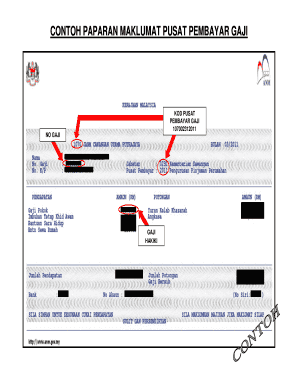
- Locate the 'Kod Pusat' field and enter the unique identification code for the payment center: 107002312011.
- Identify the 'No Gaji' section, where you will input the specific salary number associated with the payment.
- In the 'Gaji Hakiki' field, provide the accurate amount of the salary to be paid, ensuring the figure is correctly formatted.
- Review all entered information for accuracy. Make corrections as necessary to ensure that the data accurately reflects the intended salary details.
- After verifying the accuracy of the form, users can choose to save changes, download, print, or share the completed form as needed.
Complete your documents online today for seamless processing.