Loading
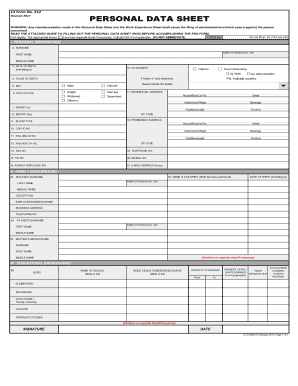
Get Cs Form No
How it works
-

Open form follow the instructions
-

Easily sign the form with your finger
-

Send filled & signed form or save
How to fill out the CS Form No online
Filling out the CS Form No is an essential step in your application process. This guide provides clear directions to help you complete the Personal Data Sheet accurately and efficiently.
Follow the steps to successfully complete the CS Form No
- Click ‘Get Form’ button to obtain the form and access it in the online editor.
- Begin by filling in your personal information. Ensure to input your surname, first name, and middle name accurately in the designated fields. If applicable, include your name extension. Remember to use capital letters legibly.
- Provide your date of birth in the format mm/dd/yyyy and clearly indicate your citizenship status, ticking the appropriate box. If you have dual citizenship, specify the country.
- Fill in your place of birth, sex, and civil status by selecting from the provided options. If your status is not listed, indicate it in the space provided.
- Input your residential and permanent addresses including the house/block/lot number, street, subdivision, barangay, city/municipality, province, and ZIP code.
- Fill in your physical attributes such as height (in meters) and weight (in kilograms), as well as your blood type.
- Complete the fields for your government identification numbers, including GSIS, PAG-IBIG, PhilHealth, SSS, TIN, and agency employee number.
- Outline your family background by entering details about your spouse, children, father, and mother. Use full names and include necessary birthdates and occupations. If needed, continue on a separate sheet.
- Document your educational background by detailing each level of education, the names of the schools attended, and honors received.
- List your civil service eligibility along with the details for any examinations you have completed in the specified fields.
- Record your work experience beginning with your most recent job. Include job title, agency or company name, and employment dates. Describe your duties as needed.
- Fill in details regarding any voluntary work or civic involvement and include relevant learning and development interventions or training programs you have attended.
- Complete sections on special skills, affiliations, and non-academic distinctions. Provide information on any relationships that are pertinent to your application.
- Finally, review all entered information for accuracy. Sign and date the form. You may be required to upload a recent ID photo and government-issued identification.
- Once you have filled out all sections and are satisfied with your entries, save your changes and download a copy of the form. You can also print or share it as needed.
Complete your CS Form No online today to streamline your application process.
CSC Forms. Examination, Recruitment and Placement. Civil Service Examination Form - CS Form No. 100 (Revised September 2016) Customized Application Forms for grant of eligibility under special laws and CSC issuances.
Industry-leading security and compliance
US Legal Forms protects your data by complying with industry-specific security standards.
-
In businnes since 199725+ years providing professional legal documents.
-
Accredited businessGuarantees that a business meets BBB accreditation standards in the US and Canada.
-
Secured by BraintreeValidated Level 1 PCI DSS compliant payment gateway that accepts most major credit and debit card brands from across the globe.