Loading
Get Administrativna Zabrana
How it works
-

Open form follow the instructions
-

Easily sign the form with your finger
-

Send filled & signed form or save
How to fill out the Administrativna Zabrana online
The Administrativna Zabrana is an official document that may be required for various administrative and financial procedures. Filling out this form correctly is essential to ensure accurate processing and compliance with legal requirements.
Follow the steps to complete the Administrativna Zabrana form online.
- Click ‘Get Form’ button to access the document and open it in your preferred form editor.
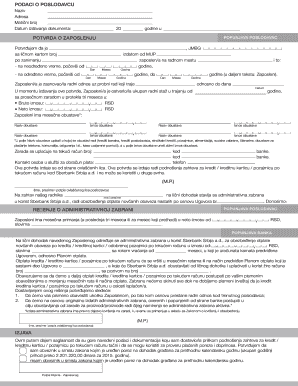
- Fill in the employer's information in the section labeled 'Podaci o poslodavcu'. This includes the name, address, registration number, and the date of issuance of the document.
- Provide details of the employee in the 'Potvrda o zaposlenju' section. Enter the employee's name, personal identification number, occupation, and employment type (either permanent or temporary).
- Indicate the start date of employment and the end date if applicable. Make sure to fill this in using the correct day, month, and year format.
- Document the employee's total work experience and their average salary over the past three months in both gross and net amounts.
- Specify any monthly deductions pertinent to the employee. List the types of deductions and their corresponding amounts, ensuring to summarize them accurately.
- In the section for the administrative ban, state the employee's full name and the lender's name (Sberbank Srbija a.d.) for which the administrative ban is being applied.
- Set forth the amount of the administrative ban, ensuring that it reflects the total obligations the employee has towards the lender.
- Include payment information regarding how the payments will be processed, including the employee's bank account number and additional details needed for the lender's records.
- Complete the declaration section, where the employee must provide consent concerning the accuracy of the submitted information. This is followed by the employee's signature.
- Review the entire document for potential errors and ensure all information is complete before proceeding.
- Upon completion, users can save changes, download the document, print it, or share it with relevant parties to fulfill administrative requirements.
Start filling out your Administrativna Zabrana online today to streamline your administrative processes.