Loading
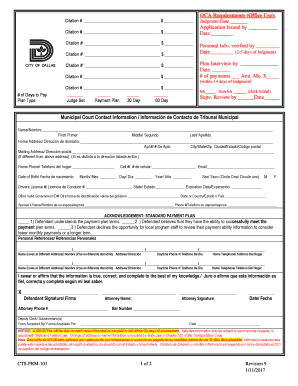
Get Municipal Form 101
How it works
-

Open form follow the instructions
-

Easily sign the form with your finger
-

Send filled & signed form or save
How to fill out the Municipal Form 101 online
Filling out the Municipal Form 101 online is a straightforward process that allows users to easily submit required information for municipal proceedings. This guide provides step-by-step instructions to help you navigate the form with confidence.
Follow the steps to successfully complete the Municipal Form 101 online.
- Click ‘Get Form’ button to access the Municipal Form 101 and open it for filling out.
- Begin by entering the citation numbers and corresponding amounts in the designated fields for each citation listed.
- Fill in the OCA requirements section, including judgment date and application issued information.
- Provide your personal information, including your full name, home address, mailing address (if different), phone numbers, email address, and date of birth.
- Indicate your driver's license number and other valid government ID information in the appropriate fields.
- Complete the section for personal references by entering the names, addresses, and phone numbers of individuals who can serve as references.
- Read and acknowledge the payment plan terms by marking the appropriate checkboxes.
- Fill in banking and financial information, including additional income sources, bank account details, and expenses.
- Review and confirm that all information provided is true, correct, and complete by providing your signature in the designated area.
- Once all sections are completed, save your changes, and you may download, print, or share the form as needed.
Take the time to complete your Municipal Form 101 online today for efficient processing.
Related links form
PROCESS: Fill out the Certificate of Live Birth form and submit it to the City Civil Registry Department together with other requirements. The receiving clerk will check if the requirements are complete and will assign a registry number to the client. Finally, the clerk will release the document to the registrant.