Loading
Get Formular Aplikimi
How it works
-

Open form follow the instructions
-

Easily sign the form with your finger
-

Send filled & signed form or save
How to fill out the Formular Aplikimi online
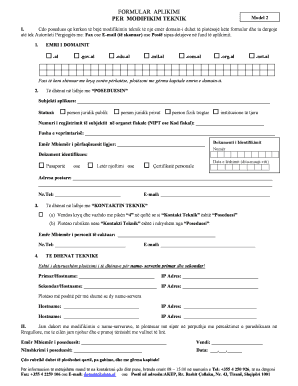
This guide provides clear and supportive instructions for users on how to successfully fill out the Formular Aplikimi online for technical modifications to a domain name. Each section of the form is explained in detail to ensure a smooth completion process.
Follow the steps to fill out the form accurately and efficiently.
- Click ‘Get Form’ button to obtain the form and open it in the editor.
- In the section labeled 'EMRI I DOMAINIT', select the appropriate domain type by marking the corresponding checkbox, then enter the domain name in capital letters.
- Next, proceed to fill in the details regarding the 'POSEDUESIN'. Specify whether the applicant is a public legal entity, private legal entity, commercial individual, or another institution. Provide the registration number with the fiscal authorities (NIPT or tax code) and state the activity's field.
- Enter the full name of the legal representative, along with their identification document type, and include the document number and issue date.
- Provide the postal address and contact number of the applicant.
- Next, in the 'KONTAKTIN TEKNIK' section, indicate if the technical contact is the same as the owner, otherwise, fill in the designated person's name and phone number.
- Complete the email address for the technical contact.
- Proceed to fill out the 'TE DHENAT TEKNIKE' section, providing mandatory information for the primary and secondary name servers, including their hostnames and IP addresses.
- If there are more than two name servers, fill out additional lines for each server's hostname and IP address.
- In the final section, confirm your agreement to the modifications by entering your full name, location, signature, and date. Ensure clarity and accuracy in this section.
- Once all information is complete, users can save the changes, download the form, print it, or share it as needed.
Complete the form online to facilitate your domain modification process.
Industry-leading security and compliance
US Legal Forms protects your data by complying with industry-specific security standards.
-
In businnes since 199725+ years providing professional legal documents.
-
Accredited businessGuarantees that a business meets BBB accreditation standards in the US and Canada.
-
Secured by BraintreeValidated Level 1 PCI DSS compliant payment gateway that accepts most major credit and debit card brands from across the globe.