Loading
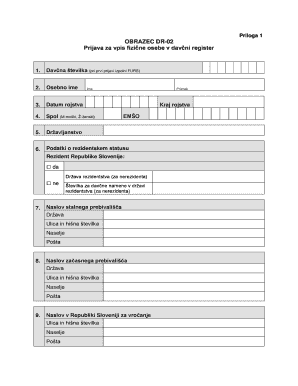
Get Obrazec Dr 02
How it works
-

Open form follow the instructions
-

Easily sign the form with your finger
-

Send filled & signed form or save
How to fill out the Obrazec Dr 02 online
Filling out the Obrazec Dr 02, the application for registration of an individual in the tax register, can be a straightforward process if approached step by step. This guide provides clear direction to assist users in completing the form accurately online.
Follow the steps to fill out the Obrazec Dr 02 online.
- Click the ‘Get Form’ button to obtain the Obrazec Dr 02 and open it for editing.
- Enter your tax number in the first field. If this is your first application, leave this field blank, and it will be filled by the tax authority.
- Provide your personal name in the designated fields, entering your first name followed by your surname.
- Fill in your date of birth, ensuring to include the day, month, and year.
- Indicate your gender by selecting 'M' for male or 'Ž' for female.
- List your citizenship, specifying all applicable citizenships if you have more than one.
- Complete the residency status section by marking 'yes' if you are a resident of Slovenia or 'no' if you are a non-resident.
- If you marked 'no' for residency, provide the country of residency and the tax identification number applicable in that country.
- Fill in your permanent residence address, including the street name, house number, municipality, and postal code.
- If applicable, provide your temporary residence address in the same format as your permanent address.
- Specify the address in Slovenia for correspondence if you prefer it different from your permanent or temporary residence.
- Input details of foreign accounts, including the account number in IBAN structure, the bank's name with the SWIFT/BIC code, country where the account is held, and the dates of account opening and closing.
- Select your employment status and provide the name of your employer if you are employed. Indicate if you are registered with the Employment Service.
- Enter information about any representatives authorized to act on your behalf, including their tax number, personal name, and residential address, along with the scope of their authority.
- Provide your email address and any details related to your digital certificate.
- Include any details about capital investments both locally and internationally. Indicate whether you are registering, changing, or deregistering these investments.
- State the reason for your registration, marking the appropriate option and providing a brief description if necessary.
- Document any procedures related to insolvency or other termination processes that apply to you, including the relevant dates.
- Review all your provided information for accuracy and completeness. Then, you can save the changes, download the completed form, print it, or share it as needed.
Complete your documents online to ensure a smooth registration process.