Loading
Get Federalism Worksheet Pdf Answer Key
How it works
-

Open form follow the instructions
-

Easily sign the form with your finger
-

Send filled & signed form or save
How to fill out the Federalism Worksheet Pdf Answer Key online
This guide provides a clear and supportive approach to filling out the Federalism Worksheet Pdf Answer Key online. By following these instructions, users can successfully navigate each component of the worksheet.
Follow the steps to complete the Federalism Worksheet Pdf Answer Key online
- Click ‘Get Form’ button to obtain the form and open it in your preferred online PDF editor.
- Begin by identifying your understanding of federalism as required in the first section. Write a brief definition based on the context provided in the worksheet.
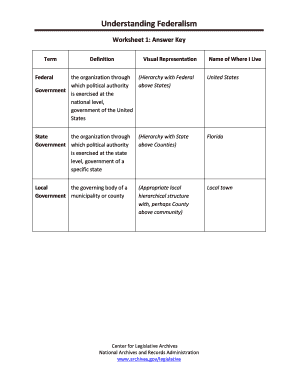
- In Worksheet 1, complete the term and definition sections. Ensure you match each term with the appropriate definition as you analyze the components.
- Move to Worksheet 2. Carefully read each example presented and indicate the level of government (Federal, State, Local) that corresponds to each scenario by writing the letter of your choice in the space provided.
- For Worksheet 3, review the preambles of the Articles of Confederation and the U.S. Constitution. Draft diagrams as directed that illustrate the relationships described in the texts.
- Proceed to Worksheet 4 where you will label powers as enumerated, denied, or reserved based on your understanding of the Constitution's Article I and the Tenth Amendment.
- In Worksheet 5, summarize the legislation provided and analyze the shifts in power identified through the examples of the Social Security Bill and the Voting Rights Act.
- Lastly, for Worksheet 6, read the narrative and label each instance of government as local, state, federal, or concurrent according to the instructions given.
- After completing all worksheets, review your answers for clarity and correctness. Save your changes, and download or print the completed form for your records.
Complete your Federalism Worksheet Pdf Answer Key online to enhance your understanding of government structures.
Numbers Select the cells or table you want to format. In the Format sidebar, click the Cell tab. Click the Data Format pop-up menu and choose an option: Number: Displays standard number formatting. Set the number of decimal places: In the Decimals field, type the number of decimal places you want to display.