Loading
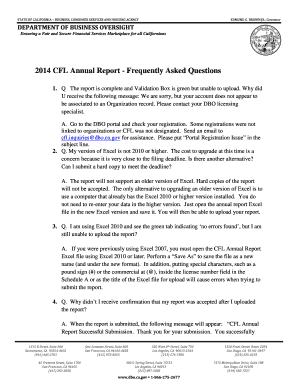
Get 2014 Cfl Annual Report - Frequently Asked Questions
How it works
-

Open form follow the instructions
-

Easily sign the form with your finger
-

Send filled & signed form or save
How to fill out the 2014 CFL Annual Report - Frequently Asked Questions online
This guide is designed to assist users in completing the 2014 CFL Annual Report - Frequently Asked Questions online. It provides detailed, step-by-step instructions to ensure that you can navigate the form with confidence and ease.
Follow the steps to complete the 2014 CFL Annual Report online.
- Click ‘Get Form’ button to obtain the form and open it in the appropriate program.
- Ensure that you are using Microsoft Excel 2010 or later. If you are using an older version, find a computer with the necessary version installed, open the annual report Excel file, and save it to ensure compatibility.
- Fill in all required fields accurately. Pay special attention to avoid using special characters in the license number field, as these can cause submission errors.
- Once you have completed the report, perform a final check for accuracy and ensure that the validation box is green to confirm that no errors were found.
- Submit your completed report online through the portal. After submission, look for a confirmation message stating that your report was successfully submitted.
- If further information is required or if there are issues, the Department will contact you. Keep records of your submission confirmation for your records.
- If you need additional space to list officers and directors beyond the 50 lines provided, prepare a separate list and upload it as a PDF.
- Lastly, ensure you save any changes and download a copy of the report for your records. You may also choose to print or share the completed report as needed.
Complete your 2014 CFL Annual Report online today to ensure timely submission and compliance.
Related links form
Contact the CA-DFPI by email at CFL.Inquiries@dfpi.ca.gov or phone at (866) 275-2677 to request your transition number. Input this number as your license number when transitioning onto NMLS, and the CA-DFPI will input your license number when approving the transition.
Industry-leading security and compliance
US Legal Forms protects your data by complying with industry-specific security standards.
-
In businnes since 199725+ years providing professional legal documents.
-
Accredited businessGuarantees that a business meets BBB accreditation standards in the US and Canada.
-
Secured by BraintreeValidated Level 1 PCI DSS compliant payment gateway that accepts most major credit and debit card brands from across the globe.