Loading
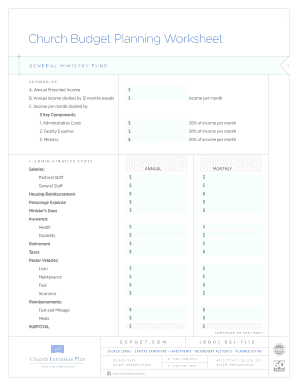
Get Church Budget Planning Worksheet
How it works
-

Open form follow the instructions
-

Easily sign the form with your finger
-

Send filled & signed form or save
How to fill out the Church Budget Planning Worksheet online
The Church Budget Planning Worksheet is a vital tool for managing your ministry's finances. This guide will provide you with clear, step-by-step instructions to help you efficiently fill out the form online.
Follow the steps to complete the Church Budget Planning Worksheet.
- Click ‘Get Form’ button to obtain the Church Budget Planning Worksheet and open it in your editor.
- Enter the annual projected income in the designated field. This figure forms the basis for all calculations in the worksheet.
- Calculate the monthly income by dividing the annual income by 12. Input this number in the provided field labeled as income per month.
- Fill out the administrative costs section, allocating 30% of the income per month to various categories such as salaries, benefits, and operational expenses. Be sure to distinguish between annual and monthly expenses.
- Move to the facility expenses section and allocate funds for costs such as mortgage, insurance, and maintenance. Again, account for both annual and monthly expenses.
- Complete the ministry expenses section, categorizing funds for various ministries and outreach programs. Ensure to break down both annual and monthly totals.
- Review all entries for accuracy and completeness. Utilize the summary section to ensure no components have been overlooked.
- Once all data is entered, you can save your changes, download the worksheet, print it out, or share it with the necessary stakeholders.
Start filling out the Church Budget Planning Worksheet online today to ensure effective financial management for your ministry.
Rent. Groceries. Daily Incidentals. Irregular Expenses and Emergency Fund. Household Maintenance. Work Wardrobe and Upkeep. Subscriptions. Guests.