Loading
Get Civil Cover Sheet Mn
How it works
-

Open form follow the instructions
-

Easily sign the form with your finger
-

Send filled & signed form or save
How to fill out the Civil Cover Sheet Mn online
This guide provides a comprehensive overview of how to effectively complete the Civil Cover Sheet Mn online. By following these detailed steps, users can ensure that they accurately fill out each section of the form to meet the necessary requirements.
Follow the steps to complete your Civil Cover Sheet Mn online
- Press the ‘Get Form’ button to access the Civil Cover Sheet Mn and open it for editing.
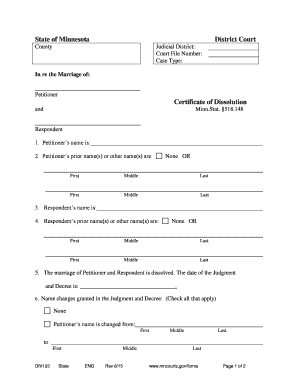
- Enter the district court information, including the county and judicial district associated with your case.
- Fill in the court file number, which is a unique identifier for your case.
- Specify the type of case being filed, in this instance, select ‘Certificate of Dissolution’.
- Provide the name of the petitioner, which is the person initiating the dissolution process.
- List any prior names or other names used by the petitioner. If none, indicate 'None'.
- Repeat the previous step for the respondent, ensuring to provide their name and any prior names.
- Indicate the date of the Judgment and Decree for the marriage dissolution.
- Check the relevant boxes to identify any name changes granted in the Judgment and Decree for both the petitioner and the respondent.
- Complete the form by ensuring all sections are filled. Save your changes, download the document, print, or share it as needed.
Begin completing your Civil Cover Sheet Mn online today for a smoother filing process.
Civil Case Cover Sheet (CM-010) Tells the court some basic information about a case being filed. Filed at the beginning of all civil cases except family law cases.