Loading
Get It112r
How it works
-

Open form follow the instructions
-

Easily sign the form with your finger
-

Send filled & signed form or save
How to fill out the It112r online
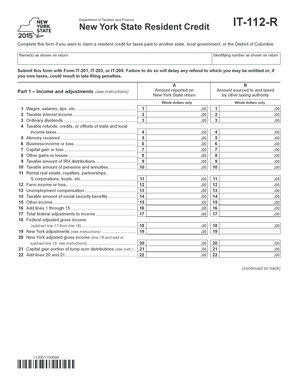
The It112r form, issued by the New York State Department of Taxation and Finance, allows users to claim a resident credit for taxes paid to another state, local government, or the District of Columbia. This guide provides clear and step-by-step instructions to assist users in completing this form online.
Follow the steps to accurately complete the It112r online.
- Click the ‘Get Form’ button to access and open the It112r form in your preferred editor.
- Enter your name(s) as shown on your tax return in the designated field. This should match exactly to avoid any discrepancies.
- Input your identifying number as it appears on the return. This number is essential for processing your claim.
- Indicate the amount of income sourced to and taxed by another authority in the specified section.
- Begin filling out Part 1, which focuses on income and adjustments. Report whole dollar amounts for wages, taxable interest, dividends, and any other income as advised.
- Proceed to Part 2 to compute your resident credit. Start by entering the two-letter abbreviation for the state or locality where taxes were paid.
- State the total amount of income tax imposed on this year’s return by the other jurisdiction in the corresponding field.
- If applicable, mark an X in the box for taxes paid on a group return and provide the group’s EIN.
- Calculate the New York State tax payable and follow the instructions for dividing and multiplying amounts as specified in the guidelines.
- Complete Part 3 by detailing the tax due before credits and any other credits applied. This will assist in determining your final credit amount.
- In Part 4, if you opt to provide details from your return filed with the other state or authority, fill in the necessary information, including amounts withheld and any overpayment.
- Review all information entered for accuracy before finalizing. Once completed, you can save your changes, download, print, or share the form as needed.
Begin your online process to complete the It112r form today.
One return in question has taxable income of 250,773. The calculation of ((250,773-12000) * . 00228 ) + 21 = $565 which is what TurboTax calculated.