Loading
Form preview
  • US Legal Forms
  • Other Templates
  • More Forms
  • More Uncategorized Forms
  • Evaluation Report Special Education - Opi Mt

Get Evaluation Report Special Education - Opi Mt

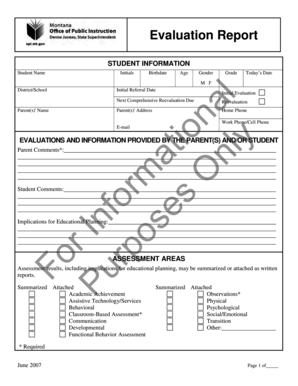
Evaluation Report STUDENT INFORMATION Student Name Initials Birthdate Age Gender Grade Todays Date M F Initial Referral Date Initial Evaluation Fo rI Pu n fo rp r os m at es i on O nl al y District/School.

How it works

  1. Open form

    Open form follow the instructions

  2. Easily sign form

    Easily sign the form with your finger

  3. Share form

    Send filled & signed form or save

How to fill out the Evaluation Report Special Education - Opi Mt online

Filling out the Evaluation Report Special Education - Opi Mt online is an important step in ensuring that students receive the appropriate support and services they need. This guide provides clear and detailed instructions to help users navigate the form effectively.

Follow the steps to accurately complete the evaluation report.

  1. Click ‘Get Form’ button to obtain the form and open it in the editor.
  2. Begin by entering the student's information. Ensure you provide the full name, initials, birthdate, age, gender, grade, today's date, and initial referral date. Fill in the appropriate information regarding the district or school and the parent(s)' names and contact details.
  3. In the evaluations and information section, provide any relevant comments from the parent(s) and student. It's crucial to note implications for educational planning based on these comments.
  4. Complete the assessment areas section. Mark if assessment results are summarized or attached and provide results and implications for educational planning for each area assessed, such as academic achievement, behavioral, and communication.
  5. For the eligibility determination section, indicate whether the student is eligible for special education. Include a detailed explanation of the basis for this determination, and check all applicable disability categories.
  6. If the student is not eligible, provide the reasons for their ineligibility. Be clear and concise in listing the criteria that led to this conclusion.
  7. Finally, ensure that all required signatures from participants involved in the evaluation process are collected. This may include parents, teachers, and specialists.
  8. Once you have completed all sections, review the document for accuracy. Save your changes, and choose to download, print, or share the form as needed.

Complete your Evaluation Report Special Education - Opi Mt online today to ensure timely support for students.

Get form

Experience a faster way to fill out and sign forms on the web. Access the most extensive library of templates available.
Get form

Related content

Forms/Guides - Montana Office of Public...
Evaluation Report - Spanish - now Fillable ... Meeting Notice for Evaluation Team and IEP...
Learn more
Montana School Accreditation Standards &...
Jul 1, 2013 — 10.55.603 Curriculum and Assessment . ... 10.55.805 Special Education...
Learn more
Sep_29_03 DD 8890 Sep 29 03 - UserManual.wiki
We are proud to present news of interest for Montana families of children with...
Learn more

Related links form

FedEx Ship Manager PassPort New Features CERTIFICATE OF EXCUSAL OR RECUSAL Annual Education Report Fillable Online The MODsocket Way Fax Email Print - PDFfiller

Questions & Answers

Get answers to your most pressing questions about US Legal Forms API.

Contact support

The special education evaluation or assessment provides the IEP team information that will be used to determine if your child has one of the 13 types of eligible disabilities defined by IDEA and therefore qualifies them for special education services.

The evaluation report documents assessment results and review of data that assists in determining whether a student is eligible for special education, and provides information to the IEP team to assist with IEP development.

Evaluation results determine what kind of help the school will provide. Knowing your child's exact areas of difficulty allows you to get the right support.

Once the team members complete their individual assessments, they develop a comprehensive evaluation report (CER) that compiles their findings, offers an educational classification, and outlines the skills and support the child will need. The parents then have a chance to review the report before the IEP is developed.

Parents can now work with educators to develop a plan the individualized education program (IEP) to help kids succeed in school. The IEP describes the goals the team sets for a child during the school year, as well as any special support needed to help achieve them.

A comprehensive assessment is conducted to determine eligibility for special education and to identify the specific areas of strength and unique educational needs.

Getting an IEP. Referral or request is made for an evaluation. A school professional may ask that a child is evaluated to see if they have a disability. Parents may also contact the child's teacher or other school professionals to ask that their child is evaluated.

Parental consent is needed before the child may be evaluated. Evaluation needs to be completed within a reasonable time after the parent gives consent.

The child's IEP is reviewed by the IEP team at least once a year, or more often if the parents or school ask for a review. If necessary, the IEP is revised.

Get This Form Now!

Use professional pre-built templates to fill in and sign documents online faster. Get access to thousands of forms.
Get form
If you believe that this page should be taken down, please follow our DMCA take down processhere.
Get Evaluation Report Special Education - Opi Mt
Get form
  • Adoption
  • Bankruptcy
  • Contractors
  • Divorce
  • Home Sales
  • Employment
  • Identity Theft
  • Incorporation
  • Landlord Tenant
  • Living Trust
  • Name Change
  • Personal Planning
  • Small Business
  • Wills & Estates
  • Packages A-Z
  • Affidavits
  • Bankruptcy
  • Bill of Sale
  • Corporate - LLC
  • Divorce
  • Employment
  • Identity Theft
  • Internet Technology
  • Landlord Tenant
  • Living Wills
  • Name Change
  • Power of Attorney
  • Real Estate
  • Small Estates
  • Wills
  • All Forms
  • Forms A-Z
  • Other Templates
  • Legal Hub
  • About Us
  • Help Portal
  • Legal Resources
  • Blog
  • Affiliates
  • Contact Us
  • Delete My Account
  • Site Map
  • Industries
  • Forms in Spanish
  • Localized Forms
  • State-specific Forms
  • Forms Kit
  • Real Estate Handbook
  • All Guides
  • Notarize
  • Incorporation services
  • For Consumers
  • For Small Business
  • For Attorneys
  • USLegal
  • FormsPass
  • pdfFiller
  • signNow
  • altaFlow
  • DocHub
  • Instapage
Form Packages
  • Adoption
  • Bankruptcy
  • Contractors
  • Divorce
  • Home Sales
  • Employment
  • Identity Theft
  • Incorporation
  • Landlord Tenant
  • Living Trust
  • Name Change
  • Personal Planning
  • Small Business
  • Wills & Estates
  • Packages A-Z
Form Categories
  • Affidavits
  • Bankruptcy
  • Bill of Sale
  • Corporate - LLC
  • Divorce
  • Employment
  • Identity Theft
  • Internet Technology
  • Landlord Tenant
  • Living Wills
  • Name Change
  • Power of Attorney
  • Real Estate
  • Small Estates
  • Wills
  • All Forms
  • Forms A-Z
  • Other Templates
Customer Service
  • Legal Hub
  • About Us
  • Help Portal
  • Legal Resources
  • Blog
  • Affiliates
  • Contact Us
  • Delete My Account
  • Site Map
  • Industries
  • Forms in Spanish
  • Localized Forms
  • State-specific Forms
  • Forms Kit
Legal Guides
  • Real Estate Handbook
  • All Guides
Prepared for you
  • Notarize
  • Incorporation services
Our Customers
  • For Consumers
  • For Small Business
  • For Attorneys
Our Sites
  • USLegal
  • FormsPass
  • pdfFiller
  • signNow
  • altaFlow
  • DocHub
  • Instapage
Social Media
Call us now toll free:
+1 833 426 79 33
As seen in:
© Copyright 1999-2026 airSlate Legal Forms, Inc. 17 Station Street, Suite 303, Brookline, MA 02445
  • Your Privacy Choices
  • Terms of Service
  • Privacy Notice
  • Content Takedown Policy
  • Bug Bounty Program