Loading
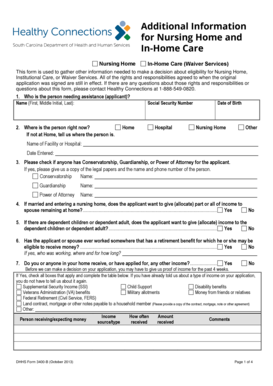
Get Dhhs Form 3400 B
How it works
-

Open form follow the instructions
-

Easily sign the form with your finger
-

Send filled & signed form or save
How to fill out the Dhhs Form 3400 B online
Filling out the Dhhs Form 3400 B is an essential step in gathering information for eligibility determination for nursing home, institutional care, or waiver services. This guide will provide you with clear, step-by-step instructions to complete the form online, ensuring you have all the necessary details to submit your application accurately.
Follow the steps to complete the form successfully.
- Click the ‘Get Form’ button to obtain the form and open it in your online editor.
- In the applicant section, provide the full name of the person needing assistance, including their first name, middle initial, and last name. Additionally, enter their Social Security number.
- Indicate the current location of the applicant. Options include home, hospital, nursing home, or another facility. If they are currently in a facility, specify the name and date entered.
- Check any applicable boxes for conservatorship, guardianship, or power of attorney, providing the names and contact numbers of those individuals if applicable.
- If the applicant is married and entering a nursing home, indicate whether income will be allocated to a spouse remaining at home by selecting yes or no.
- If there are dependent children or adults, specify whether income will be allocated to them, again selecting yes or no.
- Answer whether the applicant or their spouse has retirement benefits where they may be eligible to receive money, detailing the name of the person who worked, the employer, and duration of employment if applicable.
- Respond to questions about any income received or applied for over the past four weeks, checking all relevant sources and providing detailed income information in the table provided.
- Check any assets owned by the applicant or their spouse from the list provided, and describe each asset, including its location and estimated current value.
- Provide information on any properties owned, indicating their addresses and determining whether the applicant currently resides in or wants to return to the specified property.
- Indicate whether any bank accounts have been closed in the past five years, providing details about each account's closing balance and date.
- If applicable, detail any items sold or given as gifts during the last five years, including to whom they were given, the date, and the amount received.
- List all of the locations where the applicant has lived in the past five years, including city, county, state, and the duration of residence.
- Document information about previous spouses, including their current status, addresses, and dates of any significant events such as divorce or death.
- Provide information about the applicant’s parents, including their status (living or deceased) and relevant details.
- Complete the form by signing and dating it, confirming the relationship to the applicant.
- Review all responses for accuracy, and save your changes. You may also download, print, or share the completed form as necessary.
Complete your Dhhs Form 3400 B online today to ensure timely processing of your eligibility application.
Parent/Caretaker Relatives (formally LIF) Family SizeMonthly Income (Eff. 03/01/2023)1753.3021,018.8631,284.4341,550.005 more rows