Loading
Form preview
  • US Legal Forms
  • Form Library
  • More Forms
  • More Uncategorized Forms
  • Dshs 13 727

Get Dshs 13 727

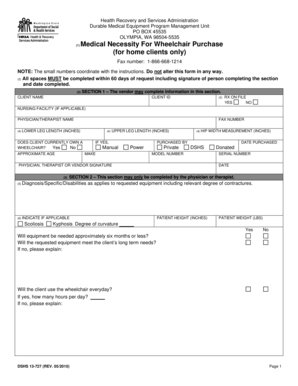
Health Recovery and Services Administration Durable Medical Equipment Program Management Unit PO BOX 45535 OLYMPIA, WA 985045535 (1) Medical Necessity For Wheelchair Purchase (for home clients only).

How it works

  1. Open form

    Open form follow the instructions

  2. Easily sign form

    Easily sign the form with your finger

  3. Share form

    Send filled & signed form or save

How to fill out the Dshs 13 727 online

The DSHS 13 727 form is essential for individuals seeking medical necessity approval for wheelchair purchases. This guide offers a step-by-step approach to filling out the form online, ensuring clarity and efficiency for both vendors and healthcare professionals.

Follow the steps to complete the Dshs 13 727 form accurately.

  1. Click 'Get Form' button to obtain the DSHS 13 727 form and open it in your preferred online editor.
  2. In Section 1, begin by entering the client’s name and client ID. If applicable, include the nursing facility information and the fax number.
  3. Proceed by filling in the measurements for lower leg length, upper leg length, and hip measurements in inches, as specified.
  4. Sign and date Section 1, ensuring all fields are completed as failure to do so may delay processing.
  5. In Section 2, provide details about the client’s diagnosis, height, weight, and assessments related to the wheelchair's necessity.
  6. Complete additional assessments regarding the accessibility of the client’s home for the requested wheelchair.
  7. Review the completed form for any omissions. Ensure both the physician or therapist's signature is included with the respective dates.

Complete your DSHS 13 727 form online to ensure a timely review of your wheelchair purchase request.

Get form

Experience a faster way to fill out and sign forms on the web. Access the most extensive library of templates available.
Get form

Related content

DCS Handbook - Section 13.060: Enforcing Medical...
Chapter 13: Tribal Enforcement. Section 13.060: ... Exception: Do not send the DSHS 09-730...
Learn more
Program: Emergency Medical Services, Basic...
(727) 210-2350 ... by the Texas Department of State Health Services (DSHS). ... For...
Learn more
Template:COVID-19 pandemic data/United States...
16-Mar-20, 2, 6, 57, 29, 3, 4, 26, 8, 11, 135, 7, 1, 12, 6, 2, 1, 19, 2, 13, 2, 1, 14, 7...
Learn more

Related links form

Form 'B' Gwinnett Daily Post Medical And Tuberculosis Clearance For New Certificated Employees Claim For Approved Child Care Payments 3-4B GDP Tue 0118 Copy 8

Questions & Answers

Get answers to your most pressing questions about US Legal Forms API.

Contact support

The logarithm of x to base b is denoted as logb (x), or without parentheses, logb x, or even without the explicit base, log x, when no confusion is possible, or when the base does not matter such as in big O notation. Plots of logarithm functions, with three commonly used bases.

The United States is one of the few countries that use “mm-dd-yyyy” as their date format–which is very very unique! The day is written first and the year last in most countries (dd-mm-yyyy) and some nations, such as Iran, Korea, and China, write the year first and the day last (yyyy-mm-dd).

Use structured logging This format is human readable and fairly easy to parse, if needed. JSON is the de facto standard for structured logging, but consider using key=value pairs, XML, or another format for your application logs.

To summarize, the best practices for log formatting include using a consistent format, including timestamps, using descriptive log levels, avoiding cluttering logs with irrelevant information, using structured logging, including relevant context information, and using log rotation.

Specifying the Date and Time Format to Use in Log Entries. By default, log entries in all logs shown in Integration Server Administrator use the format yyyy-mm-dd hh:mm:ss. You can change this format to any other format that is supported by the Java class java.

You can save the output of the date command (date "+%d%m%y") to a variable and append it to your log file name. Hope this is what you were looking for. and use this variable in the logfilename.

Log events The most Splunk-friendly ways are going to be either key=value pairs, or delimited values, JSON, or XML. I can tell you, through experience, that the easiest way to get Splunk to auto recognize the fields in a log is to use key=value pairs when writing to a log.

[10/Oct/2000:13:55:36 -0700] is the date, time, and time zone that the request was received, by default in strftime format %d/%b/%Y:%H:%M:%S %z .

Get This Form Now!

Use professional pre-built templates to fill in and sign documents online faster. Get access to thousands of forms.
Get form
If you believe that this page should be taken down, please follow our DMCA take down processhere.

Industry-leading security and compliance

US Legal Forms protects your data by complying with industry-specific security standards.
  • In businnes since 1997
    25+ years providing professional legal documents.
  • Accredited business
    Guarantees that a business meets BBB accreditation standards in the US and Canada.
  • Secured by Braintree
    Validated Level 1 PCI DSS compliant payment gateway that accepts most major credit and debit card brands from across the globe.
Get Dshs 13 727
Get form
  • Adoption
  • Bankruptcy
  • Contractors
  • Divorce
  • Home Sales
  • Employment
  • Identity Theft
  • Incorporation
  • Landlord Tenant
  • Living Trust
  • Name Change
  • Personal Planning
  • Small Business
  • Wills & Estates
  • Packages A-Z
  • Affidavits
  • Bankruptcy
  • Bill of Sale
  • Corporate - LLC
  • Divorce
  • Employment
  • Identity Theft
  • Internet Technology
  • Landlord Tenant
  • Living Wills
  • Name Change
  • Power of Attorney
  • Real Estate
  • Small Estates
  • Wills
  • All Forms
  • Forms A-Z
  • Form Library
  • Legal Hub
  • About Us
  • Help Portal
  • Legal Resources
  • Blog
  • Affiliates
  • Contact Us
  • Delete My Account
  • Site Map
  • Industries
  • Forms in Spanish
  • Localized Forms
  • State-specific Forms
  • Forms Kit
  • Real Estate Handbook
  • All Guides
  • Notarize
  • Incorporation services
  • For Consumers
  • For Small Business
  • For Attorneys
  • USLegal
  • FormsPass
  • pdfFiller
  • signNow
  • altaFlow
  • DocHub
  • Instapage
Form Packages
  • Adoption
  • Bankruptcy
  • Contractors
  • Divorce
  • Home Sales
  • Employment
  • Identity Theft
  • Incorporation
  • Landlord Tenant
  • Living Trust
  • Name Change
  • Personal Planning
  • Small Business
  • Wills & Estates
  • Packages A-Z
Form Categories
  • Affidavits
  • Bankruptcy
  • Bill of Sale
  • Corporate - LLC
  • Divorce
  • Employment
  • Identity Theft
  • Internet Technology
  • Landlord Tenant
  • Living Wills
  • Name Change
  • Power of Attorney
  • Real Estate
  • Small Estates
  • Wills
  • All Forms
  • Forms A-Z
  • Form Library
Customer Service
  • Legal Hub
  • About Us
  • Help Portal
  • Legal Resources
  • Blog
  • Affiliates
  • Contact Us
  • Delete My Account
  • Site Map
  • Industries
  • Forms in Spanish
  • Localized Forms
  • State-specific Forms
  • Forms Kit
Legal Guides
  • Real Estate Handbook
  • All Guides
Prepared for you
  • Notarize
  • Incorporation services
Our Customers
  • For Consumers
  • For Small Business
  • For Attorneys
Our Sites
  • USLegal
  • FormsPass
  • pdfFiller
  • signNow
  • altaFlow
  • DocHub
  • Instapage
Social Media
Call us now toll free:
+1 833 426 79 33
As seen in:
© Copyright 1999-2026 airSlate Legal Forms, Inc. 3720 Flowood Dr, Flowood, Mississippi 39232
  • Your Privacy Choices
  • Terms of Service
  • Privacy Notice
  • Content Takedown Policy
  • Bug Bounty Program