Loading
Get Time Distribution Report
How it works
-

Open form follow the instructions
-

Easily sign the form with your finger
-

Send filled & signed form or save
How to fill out the Time Distribution Report online
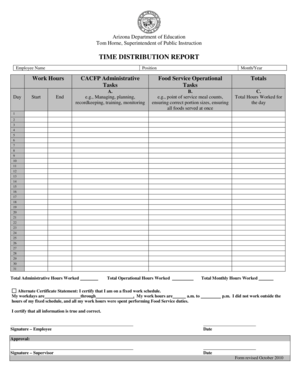
The Time Distribution Report is a crucial document used to track the time employees allocate to food service and non-food service tasks. This guide provides an easy-to-understand process for filling out the report online, ensuring accurate documentation for compensation allocation.
Follow the steps to complete the Time Distribution Report effectively.
- Click the 'Get Form' button to obtain the Time Distribution Report and open it in the editor.
- Begin by entering the employee name associated with the report. This will help identify whose time distribution is being recorded.
- Next, input the position title of the employee to clarify their role within the organization.
- Fill in the month and year that the report covers. This helps in organizing the records chronologically.
- In the work hours section, indicate the start and end times for each workday. If necessary, you can provide multiple entries for days with break periods.
- For the CACFP Administrative Tasks section (Column A), log the amount of time spent on administrative activities in half-hour increments, rounding as needed.
- For the Food Service Operational Tasks (Column B), record the time dedicated to food service tasks in 15 to 30-minute intervals.
- Enter the total hours worked for each day in Column C. At the end of the month, sum these hours to calculate Total Monthly Hours Worked.
- If applicable, complete the Alternate Certification Statement, certifying that the employee did not work outside their fixed schedule.
- Ensure the employee signs and dates the report, affirming the accuracy of the provided information.
- Have the supervisor review, sign, and date the report to approve the information documented.
- Finally, save changes, and download, print, or share the form as necessary for records and compliance.
Complete your Time Distribution Report online today for accurate documentation and compliance.
Informally, a required field is an input field on a form that must have a non-blank value to be valid. Conventionally, many flow action forms mark a required field with an orange asterisk ( ). The image itself is only a label to notify users that the field is required; it does not affect input editing or processing.