Loading
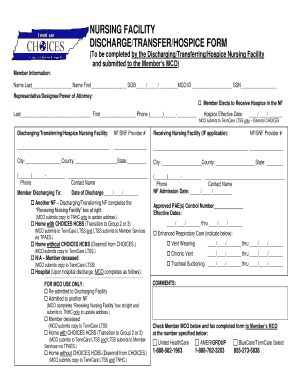
Get Nursing Facility Discharge/transfer/hospice Form - Tn
How it works
-

Open form follow the instructions
-

Easily sign the form with your finger
-

Send filled & signed form or save
How to fill out the NURSING FACILITY DISCHARGE/TRANSFER/HOSPICE FORM - Tn online
Navigating the process of discharging or transferring a member from a nursing facility can be straightforward with the right guidance. This comprehensive guide provides clear, step-by-step instructions on how to fill out the Nursing Facility Discharge/Transfer/Hospice Form - Tn online, ensuring a smooth transition for all involved.
Follow the steps to successfully complete the form online.
- Begin by selecting the ‘Get Form’ button to access the Nursing Facility Discharge/Transfer/Hospice Form and open it in your preferred editing tool.
- Fill out the member information section. Include the member's last name, first name, date of birth, MCO ID, and social security number.
- Provide details for the representative, designee, or power of attorney if applicable, including their name and phone number.
- Indicate the hospice effective date by entering the appropriate date.
- In the discharging/transferring/hospice nursing facility section, enter your facility's provider number.
- Fill out the receiving nursing facility information if applicable, including the address and contact phone number.
- Record the NF admission date for the member.
- Specify the date of discharge and select the appropriate option for the location to which the member is discharging (another nursing facility, home with or without CHOICES HCBS, or N/A if the member is deceased).
- If relevant, include any approved PAE control numbers and effective dates for enhanced respiratory care services.
- Complete any additional comments if necessary and confirm that the details are correct.
- Finally, save your changes. You can then download, print, or share the completed form as needed.
Complete your documents online for a smoother process today!
Get form
Experience a faster way to fill out and sign forms on the web. Access the most extensive library of templates available.
Click a cell that's empty, or double-click a cell that isn't empty. Start typing. Optional: To add another line within a cell, press ⌘ + Enter on a Mac or Ctrl + Enter on Windows. When you're done, press Enter.
Get This Form Now!
Use professional pre-built templates to fill in and sign documents online faster. Get access to thousands of forms.