Loading
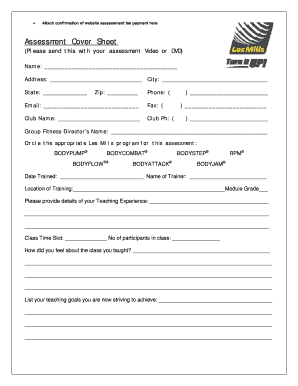
Get Assessment Cover Sheet - Les Mills
How it works
-

Open form follow the instructions
-

Easily sign the form with your finger
-

Send filled & signed form or save
How to fill out the Assessment Cover Sheet - Les Mills online
The Assessment Cover Sheet for Les Mills is an essential document for submitting your assessment video or DVD. This guide will provide you with clear and detailed steps to complete the form accurately and efficiently.
Follow the steps to fill out the Assessment Cover Sheet with ease.
- Press the ‘Get Form’ button to access the Assessment Cover Sheet and open it in your preferred document editor.
- Begin filling in your personal information in the Name, Address, City, State, and Zip fields. Ensure that all details are accurate and up-to-date.
- Input your Phone number and Email address in the designated fields, making sure to double-check for accuracy.
- Provide the Fax number if applicable and include the Club Name along with the Club Phone number.
- Enter the Group Fitness Director’s name in the specified area for proper identification.
- Circle the appropriate Les Mills program related to your assessment. Choose from options such as BODYPUMP®, BODYCOMBAT®, and others as applicable.
- Fill in the Date Trained, Name of Trainer, and Location of Training to establish your training background.
- Complete the Module Grade field to indicate your performance level.
- Provide details regarding your teaching experience in the given section. Be as descriptive as possible to reflect your qualifications.
- Indicate your Class Time Slot and the number of participants in the class to give context to your assessment.
- Describe how you felt about the class you taught. This section is important for self-reflection and assessment.
- List your teaching goals that you are currently striving to achieve, providing insight into your professional development.
- After completing all sections, review the information for accuracy, save your changes, and then download, print, or share the form as needed.
Complete and submit your Assessment Cover Sheet online to enhance your Les Mills qualifications.
Here's how to use the Strikethrough Text tool on a PDF file: Open your PDF in Adobe Acrobat online services. Select Tools, then Comment. This will bring up the Comment Toolbar. Choose the tool. The “T” with a line through it indicates the Strikethrough Text tool. ... Apply. Drag your cursor over the text you want to mark.