Loading
Get General Delivery Service Ad-pro
How it works
-

Open form follow the instructions
-

Easily sign the form with your finger
-

Send filled & signed form or save
How to fill out the GENERAL DELIVERY SERVICE AD-PRO online
Filling out the GENERAL DELIVERY SERVICE AD-PRO online can be a straightforward process with the right guidance. This guide will walk you through each step clearly and efficiently, ensuring that you can complete the form with confidence.
Follow the steps to effectively complete the form
- Click ‘Get Form’ button to obtain the form and open it in the editor.
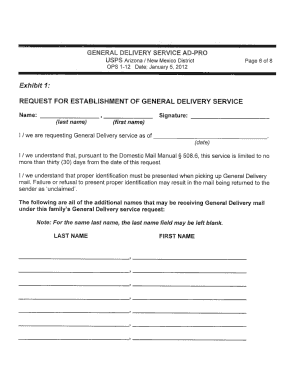
- Begin by filling in your personal information in the designated fields at the top of the form. This typically includes your full name, address, and contact information. Ensure that all details are accurate to prevent any processing delays.
- Next, provide any necessary identification or account numbers if required by the form. This might include social security numbers or identification numbers relevant to the general delivery service.
- Continue by answering any specific questions related to your delivery needs. This can include details about the package, delivery address, and preferred delivery times. Make sure to read each question carefully.
- Review all the information you have entered for accuracy. It is crucial to double-check your entries to avoid mistakes that could impact the delivery process.
- Once you have verified that all information is correct, proceed to save changes to the form. You may also choose to download, print, or share the completed form, depending on your needs.
Complete your documents online today for a hassle-free experience.
(More on that later.) “GENERAL DELIVERY” is the actual address line, and using “9999” as the ZIP+4 also indicates general delivery. Picking up your mail is easy – just go to the post office, present your identification and ask for any General Delivery mail that you've received.