Loading
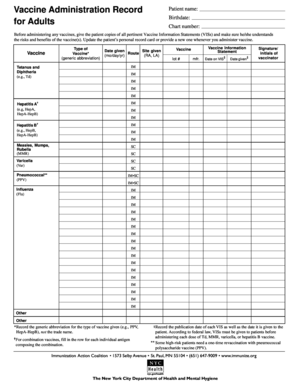
Get Date Given - Nyc
How it works
-

Open form follow the instructions
-

Easily sign the form with your finger
-

Send filled & signed form or save
How to fill out the Date Given - Nyc online
Filling out the Date Given - Nyc form is essential for documenting immunizations accurately. This guide will facilitate a smooth process for users, providing comprehensive steps to ensure all necessary information is captured correctly.
Follow the steps to complete the form online effectively.
- Press the ‘Get Form’ button to access the form and open it in your preferred editing tool.
- Begin by entering the patient's name in the designated field, ensuring spelling and capitalization are correct.
- Next, input the patient's birthdate in the format of month/day/year. This helps in identifying the patient's immunization history.
- Locate the section labeled 'Vaccine Type'. Here, record the generic abbreviation for the vaccine administered (e.g., HepA). Do not use the trade name.
- In the 'Date Given' field, enter the date the vaccine was administered, also in month/day/year format.
- In the 'Site Given' section, specify where the vaccine was administered, using abbreviations like RA for right arm and LA for left arm.
- Provide details in the 'Route' field regarding how the vaccine was given, such as IM (intramuscular) or SC (subcutaneous).
- Enter the vaccine lot number and manufacturer in their respective fields. This information is crucial for tracking vaccine batches.
- Record the date on the Vaccine Information Statement (VIS) that accompanies the vaccine. This is vital for compliance with federal regulations.
- Finally, ensure the signature or initials of the person administering the vaccine are documented in the designated section to verify the transaction.
- Once all fields are completed, review the information for accuracy before saving your changes. You can then download, print, or share the completed form as needed.
Complete your documents online today for accurate and efficient record-keeping.
Failure to quarantine is a violation of State law, and individuals who fail to quarantine are subject to a $10,000 fine. Individuals who refuse to fill out the New York State Department of Health travel form are subject to a $2,000 fine.