Loading
Form preview
  • US Legal Forms
  • Form Library
  • More Forms
  • More Uncategorized Forms
  • 735 226

Get 735 226

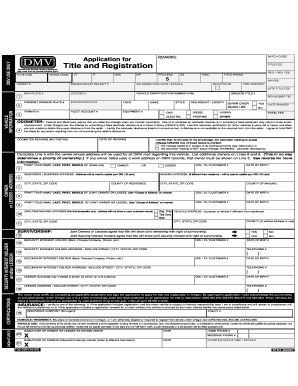
DMV USE ONLY DMV DRIVER AND MOTOR VEHICLE SERVICES 1905 LANA AVE NE, SALEM OREGON 97314 PLATE CODE BATCH CODE REMARKS: Application for Clear Form Title and Registration TRANS CODE TITLE FEE REG /.

How it works

  1. Open form

    Open form follow the instructions

  2. Easily sign form

    Easily sign the form with your finger

  3. Share form

    Send filled & signed form or save

How to fill out the 735 226 online

Filling out the 735 226 form is an essential step for successfully registering and titling your vehicle in Oregon. This guide will provide clear instructions to help you navigate each section of the form with confidence, ensuring that you complete it accurately and efficiently.

Follow the steps to complete your application with ease.

  1. Click the ‘Get Form’ button to access the 735 226 online form and open it in your preferred digital editor.
  2. Begin by entering the vehicle identification number (VIN) in the designated field. This information is crucial for identifying the specific vehicle and must be accurate.
  3. Provide the owner's true name and date of birth. Ensure to carefully check for spelling and accuracy, as this information will be linked to DMV records.
  4. Fill in the residence or business address where the owner primarily resides. If applicable, also include a separate mailing address where documents should be sent. Double-check the spelling of city, state, and zip code.
  5. Complete the vehicle information section by providing details about the make, model, year, and style of the vehicle, along with the registration weight and length as required.
  6. If applicable, fill out any information related to joint owners or lessees in the specified fields. List additional owners accurately to avoid ownership disputes.
  7. For vehicles requiring it, certify the odometer reading by entering the date of reading and current odometer reading (in miles) in the appropriate spaces provided.
  8. Review the insurance section carefully, ensuring you are compliant with financial responsibility laws before submitting the application.
  9. Finally, certify all details provided in the application by signing the form. Double-check to ensure that all necessary signatures are included where required.
  10. Once all sections are completed and verified, save your changes, download a copy of the form for your records, and submit it according to the provided instructions.

Start completing your 735 226 form online today to ensure timely processing and compliance with DMV regulations.

Get form

Experience a faster way to fill out and sign forms on the web. Access the most extensive library of templates available.
Get form

Related content

Application for Title and Registration - State of...
VEHICLE ADDRESS (Vehicle location if different from residence, or park model RV site)...
Learn more
Title and Registration - Oregon State University
735-226 (10-05). STK# 300097. COUNTER DATE STAMP / INITIALS. DOMICILE / RESIDENCY: My...
Learn more
735 6511 - UserManual.wiki
Application for Title and Registration (Form 735-226). The vehicle description in Section...
Learn more

Related links form

Software As A Service Contract Template Software Contract Template Song Contract Template Software Time And Materials Contract Template

Questions & Answers

Get answers to your most pressing questions about US Legal Forms API.

Contact support

How to Strikethrough Text in Word Highlight the text that you want to strikethrough in Word. Click the button that has a strikethrough “ab” or press Alt + H + 4 at the same time. See your strikethrough text.

Keyboard shortcuts for Google Docs Common actionsBoldCtrl + bItalicizeCtrl + iUnderlineCtrl + uStrikethroughAlt + Shift + 5110 more rows

Open Google Docs on your computer. Go to the document you want to edit or open a new document. Highlight the text that needs a strike-through and press "Alt," "Shift" and "5" together. Once you press the shortcut, Docs automatically strikes through the selected text.

For those who need an easier and quicker method of executing strikethrough commands, the keyboard shortcut for strikethrough is helpful. Just select the unnecessary content and press Ctrl + K. Right-click on the crossed-out text and choose "Delete" to remove the strikethrough from the current PDF.

If your PDF has selectable text, you'll find a working strikethough option. But if the PDF is merely an image (a picture) of text, then there's no selectable text and thus the strikethrough annotation will be grayed-out/unavailable.

Select Tools, then Comment. This will bring up the Comment Toolbar. Choose the tool. The “T” with a line through it indicates the Strikethrough Text tool.

On a PC, use the following shortcut to strike through text: Select the text you want to strike through. Press Ctrl+D. A font dialog box will appear. Press Alt+K. The strikethrough feature should now be selected. Press OK. The text will now have a line through it.

Click on the "Strikethrough" button in the Font section of the Formatting toolbar. This will add a line through the selected text. You can also use the strikethrough shortcut by pressing "Command+Shift+X" on your keyboard. This will add a line through the selected text without having to open the Formatting toolbar.

Here's how to black out text in a PDF: Open your PDF in Adobe's Acrobat online services. Select Tools, then Redact. Select text. Either double-click to select the text or drag to select lines of text. Apply redaction.

There is, however, a Word strikethrough shortcut. On a PC, use the following shortcut to strike through text: Select the text you want to strike through. Press Ctrl+D.

Get This Form Now!

Use professional pre-built templates to fill in and sign documents online faster. Get access to thousands of forms.
Get form
If you believe that this page should be taken down, please follow our DMCA take down processhere.
Get 735 226
Get form
  • Adoption
  • Bankruptcy
  • Contractors
  • Divorce
  • Home Sales
  • Employment
  • Identity Theft
  • Incorporation
  • Landlord Tenant
  • Living Trust
  • Name Change
  • Personal Planning
  • Small Business
  • Wills & Estates
  • Packages A-Z
  • Affidavits
  • Bankruptcy
  • Bill of Sale
  • Corporate - LLC
  • Divorce
  • Employment
  • Identity Theft
  • Internet Technology
  • Landlord Tenant
  • Living Wills
  • Name Change
  • Power of Attorney
  • Real Estate
  • Small Estates
  • Wills
  • All Forms
  • Forms A-Z
  • Form Library
  • Legal Hub
  • About Us
  • Help Portal
  • Legal Resources
  • Blog
  • Affiliates
  • Contact Us
  • Delete My Account
  • Site Map
  • Industries
  • Forms in Spanish
  • Localized Forms
  • State-specific Forms
  • Forms Kit
  • Real Estate Handbook
  • All Guides
  • Notarize
  • Incorporation services
  • For Consumers
  • For Small Business
  • For Attorneys
  • USLegal
  • FormsPass
  • pdfFiller
  • signNow
  • altaFlow
  • DocHub
  • Instapage
Form Packages
  • Adoption
  • Bankruptcy
  • Contractors
  • Divorce
  • Home Sales
  • Employment
  • Identity Theft
  • Incorporation
  • Landlord Tenant
  • Living Trust
  • Name Change
  • Personal Planning
  • Small Business
  • Wills & Estates
  • Packages A-Z
Form Categories
  • Affidavits
  • Bankruptcy
  • Bill of Sale
  • Corporate - LLC
  • Divorce
  • Employment
  • Identity Theft
  • Internet Technology
  • Landlord Tenant
  • Living Wills
  • Name Change
  • Power of Attorney
  • Real Estate
  • Small Estates
  • Wills
  • All Forms
  • Forms A-Z
  • Form Library
Customer Service
  • Legal Hub
  • About Us
  • Help Portal
  • Legal Resources
  • Blog
  • Affiliates
  • Contact Us
  • Delete My Account
  • Site Map
  • Industries
  • Forms in Spanish
  • Localized Forms
  • State-specific Forms
  • Forms Kit
Legal Guides
  • Real Estate Handbook
  • All Guides
Prepared for you
  • Notarize
  • Incorporation services
Our Customers
  • For Consumers
  • For Small Business
  • For Attorneys
Our Sites
  • USLegal
  • FormsPass
  • pdfFiller
  • signNow
  • altaFlow
  • DocHub
  • Instapage
Social Media
Call us now toll free:
+1 833 426 79 33
As seen in:
© Copyright 1999-2026 airSlate Legal Forms, Inc. 3720 Flowood Dr, Flowood, Mississippi 39232
  • Your Privacy Choices
  • Terms of Service
  • Privacy Notice
  • Content Takedown Policy
  • Bug Bounty Program