Loading
Get Indiana Department Of Workforce Development
How it works
-

Open form follow the instructions
-

Easily sign the form with your finger
-

Send filled & signed form or save
How to fill out the Indiana Department Of Workforce Development online
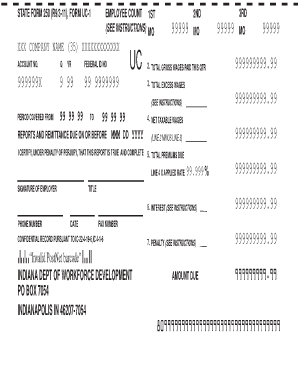
This guide provides a comprehensive overview of how to complete the Indiana Department of Workforce Development UC-1 Voucher form online. By following the steps outlined, users can ensure their submissions are accurate and complete.
Follow the steps to complete the form accurately.
- Click ‘Get Form’ button to obtain the form and open it in the designated interface.
- In the first section, enter the name of the company and the account number in the appropriate fields. Ensure that all details are accurate to avoid processing delays.
- Proceed to fill in the total gross wages paid for the quarter. This information should reflect all earnings before deductions.
- Next, provide the net taxable wages in the designated field. This is the total gross wages minus any deductions applicable.
- Calculate the total premiums due by applying the appropriate rate to the net taxable wages. Enter this figure in the corresponding section.
- Review and certify the accuracy of the report. Sign the document where indicated and include your title and contact details.
- Finally, ensure all sections are completed, then save changes to your document. You may now download, print, or share the completed form as needed.
Complete your documents online for a smooth and efficient filing process.
It generally takes two to three weeks after you file your claim to receive your first benefit check, according to the Labor Department. This may differ by state and may be delayed due to a surge in volume being reported by unemployment offices around the country.