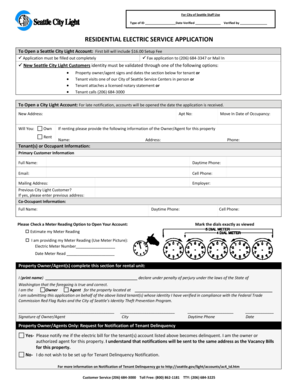
For City of Seattle Staff Use Type of ID Date Verified Verified by RESIDENTIAL ELECTRIC SERVICE APPLICATION To Open a Seattle City Light Account: First bill will include $16.00 Setup Fee ? Application.
Open form follow the instructions
Easily sign the form with your finger
Send filled & signed form or save
How to fill out the Seattle City Light Residential Electric Service Application online
This guide provides step-by-step instructions for completing the Seattle City Light Residential Electric Service Application online. By following these clear instructions, users will ensure that their application is filled out correctly and efficiently.
Follow the steps to complete your application online:
- Press the ‘Get Form’ button to retrieve the Seattle City Light Residential Electric Service Application and open it in your preferred digital editor.
- Provide your new address, including the apartment number if applicable, and indicate whether you own or rent the property.
- Enter your intended move-in date for occupancy.
- If you are renting, fill out the landlord or agent's details, including their name, address, and phone number.
- Input your primary customer information, including your full name, daytime phone number, email, cell phone, mailing address, and employer.
- Indicate whether you are a previous Seattle City Light customer by providing your previous address if applicable.
- If there is a co-occupant, provide their full name, daytime phone number, and cell phone.
- Select a meter reading option to open your account, either by estimating the meter reading or providing an exact reading along with the electric meter number and the date the meter was read.
- Complete the property owner or agent section, providing your printed name, signature, city, daytime phone number, and date. Declare your authority regarding the application submission.
- Decide on the notification of tenant delinquency. Mark yes or no to indicate whether you wish to be notified if the tenant’s account becomes delinquent.
- Once all sections are completed, save your changes, and you may choose to download, print, or share the application as needed.
Complete your application online today to ensure a smooth setup of your Seattle City Light electricity service.
Experience a faster way to fill out and sign forms on the web. Access the most extensive library of templates available.
Related content
RESIDENTIAL ELECTRIC SERVICE APPLICATION. To Open a Seattle City Light Account: First bill...
Seattle City Light is a publicly owned utility dedicated to exceeding our customer...
Seattle is a seaport city on the West Coast of the United States. It is the seat of King...
Get answers to your most pressing questions about US Legal Forms API.
How do I contact the city light in Seattle?
Get Help. Residential customers can review frequently asked questions or call (206) 684-3000 for assistance. Small and medium businesses can call (206) 256-5200 for additional assistance. Large businesses can contact a Business Customer Service Representative for more information.
What is the rate increase for Seattle City Light?
However, due to a passthrough credit from the Bonneville Power Administration (BPA), City Light customers will receive a bill credit of 1.8% on average, making the net 2022 rate increase closer to 2.1%....Seattle City Light 2022 Rate Increase. 2022 Rate IncreaseAdopted City Light Rate Increase3.9%Average 2022 Net Increase2.1%1 more row • Jan 6, 2022
What is the phone number for Seattle City Light Construction Services?
City Light has flexible payment plans available to all customers. For income-eligible residential customers, we have. If your electricity has been disconnected, call (206) 684-3000 Monday – Friday 7:30 am – 6:00 pm to discuss your options.
How do I activate my Seattle Utilities account?
If you are a current or former customer and need to move, open, or close an account, you have three options: Online: You can now start or stop water, sewer, electricity, garbage, recycling, or food/yard waste services on the Utility Services Website. ... By Phone: Call Customer Service at (206) 684-3000.
How do I verify my identity online?
How to verify your identity Your State-Issued ID. You can upload a photo of your ID by phone or by computer. Don't have a state issued ID? Social Security number. Your phone number. If we can't verify your phone number, you can verify by mail instead which takes approximately 3-7 business days.
How do I set up a Seattle City Light account?
Or, you can call (206) 684-3000. If you have had a City Light account in the past, you can start service online or call (206) 684-3000.
How do I verify my identity on Seattle City Light?
Identity verification options Contact us at (206) 684-3000 to complete an application and verify your identity through Equifax or previous utility account information over the phone. When you verify your identity in person, we will send confirmation to the utilities.
Use professional pre-built templates to fill in and sign documents online faster. Get access to thousands of forms.
If you believe that this page should be taken down, please follow our DMCA take down process here.