Loading
Form preview
  • US Legal Forms
  • Other Templates
  • More Forms
  • More Uncategorized Forms
  • Tabs: Frasier's Traits, Attributes And Behaviors - Opi Mt

Get Tabs: Frasier's Traits, Attributes And Behaviors - Opi Mt

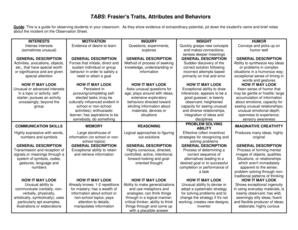
TABS: Frasier's Traits, Attributes and Behaviors Guide: This is a guide for observing students in your classroom. As they show evidence of extraordinary potential, jot down the student's name and.

How it works

  1. Open form

    Open form follow the instructions

  2. Easily sign form

    Easily sign the form with your finger

  3. Share form

    Send filled & signed form or save

How to fill out the TABS: Frasier's Traits, Attributes And Behaviors - Opi Mt online

The TABS: Frasier's Traits, Attributes And Behaviors - Opi Mt form is a crucial tool for observing and documenting student behavior and potential in educational settings. This guide will provide you with clear, step-by-step instructions on how to effectively complete this form online, ensuring that you accurately capture each student's unique traits and abilities.

Follow the steps to complete the form efficiently.

  1. Press the 'Get Form' button to obtain the TABS form and open it in your preferred digital format.
  2. Begin by entering the student's name in the designated field at the top of the form. This identification is essential for accurate tracking and documentation.
  3. Proceed to fill in the 'Interests' section by noting any intense or unusual interests displayed by the student. Use specific examples where applicable.
  4. Next, in the 'Motivation' section, provide evidence of the student's desire to learn. Look for cues that indicate their enthusiasm and passion for subjects.
  5. In the 'Inquiry' section, describe any questions the student has asked or experiments they have conducted. This will help to showcase their exploration and curiosity.
  6. Continue by completing the 'General Description' areas associated with each trait listed on the form. Be detailed in describing how these traits manifest in the student.
  7. Lastly, review all entries for accuracy and clarity. Save your changes, and consider downloading, printing, or sharing the completed form as necessary.

Ensure you complete the TABS form online today to provide the best insights into student potential.

Get form

Experience a faster way to fill out and sign forms on the web. Access the most extensive library of templates available.
Get form

Related content

TN Supplementary Gifted Performance Checklist...
Appendix A: TN Assessment Instrument Selection Form (TnAISF) ... Additionally, 10 core...
Learn more
data:image/png;base64 - The Beauty and Joy of...
... ,distance,football,server,mouth,paying,properly,mountain,assist,cialis,delivery...
Learn more

Related links form

Vendor Service Level Agreement Template Proposal Agreement Template Private Car Loan Agreement Template Venture Capital Loan Agreement Template

Questions & Answers

Get answers to your most pressing questions about US Legal Forms API.

Contact support

Generate a key Open the Command Prompt as an administrator, and navigate to the Apache directory for Tableau Server. For example, run the following command: ... Run the following command to create the key file: openssl.exe genrsa -out <yourcertname>.key 4096.

Convert Files to PEM Format Last Updated November 7, 2021 Syntax: openssl rsa -in <path-to-key-file> -text <path-to-PEM-file> Example: openssl rsa -in C:\Certificates\serverKeyFile.key -text > serverKeyFileInPemFormat.pem.

Use a physical safe or a fireproof safe: This can be done if you have a physical copy of the certificate. Keeping them in a safe will prevent it from damage due to fire, water or physical access.

How to Convert Files from CRT to CER Double-click on the yourwebsite. ... Click on the Details tab, and then select the Copy to file button. Click Next in the certificate wizard. Choose Base-64 encoded X. ... Now, browse to store your file and type in the filename that you want to keep. Finally, save the file.

Creating a .pem with the Entire SSL Certificate Trust Chain Open a text editor (such as wordpad) and paste the entire body of each certificate into one text file in the following order: The Primary Certificate - your_domain_name.crt. The Intermediate Certificate - DigiCertCA.crt. The Root Certificate - TrustedRoot.crt.

On a computer that has the Windows operating system installed, the operating system stores a certificate locally on the computer in a storage location called the certificate store.

. cer Open the certificate in any text editor. Go to File. Click on Save As. In Save as type “Select All Files.” In the File name, enter the file name and the extension you want to convert (. cer, . der). Click on Save As.

Convert Files to PEM Format Last Updated November 7, 2021 Syntax: openssl rsa -in <path-to-key-file> -text <path-to-PEM-file> Example: openssl rsa -in C:\Certificates\serverKeyFile.key -text > serverKeyFileInPemFormat.pem.

. cer Open the certificate in any text editor. Go to File. Click on Save As. In Save as type “Select All Files.” In the File name, enter the file name and the extension you want to convert (. cer, . der). Click on Save As.

Creating your certificate. crt file: Open Notepad. Open the newly generated certificate. ... Copy the section starting from and including -----BEGIN CERTIFICATE----- to -----END CERTIFICATE----- ... Create a new file using Notepad. Paste the information into the new Notepad file. Save the file as certificate.

Get This Form Now!

Use professional pre-built templates to fill in and sign documents online faster. Get access to thousands of forms.
Get form
If you believe that this page should be taken down, please follow our DMCA take down processhere.
Get TABS: Frasier's Traits, Attributes And Behaviors - Opi Mt
Get form
  • Adoption
  • Bankruptcy
  • Contractors
  • Divorce
  • Home Sales
  • Employment
  • Identity Theft
  • Incorporation
  • Landlord Tenant
  • Living Trust
  • Name Change
  • Personal Planning
  • Small Business
  • Wills & Estates
  • Packages A-Z
  • Affidavits
  • Bankruptcy
  • Bill of Sale
  • Corporate - LLC
  • Divorce
  • Employment
  • Identity Theft
  • Internet Technology
  • Landlord Tenant
  • Living Wills
  • Name Change
  • Power of Attorney
  • Real Estate
  • Small Estates
  • Wills
  • All Forms
  • Forms A-Z
  • Other Templates
  • Legal Hub
  • About Us
  • Help Portal
  • Legal Resources
  • Blog
  • Affiliates
  • Contact Us
  • Delete My Account
  • Site Map
  • Industries
  • Forms in Spanish
  • Localized Forms
  • State-specific Forms
  • Forms Kit
  • Real Estate Handbook
  • All Guides
  • Notarize
  • Incorporation services
  • For Consumers
  • For Small Business
  • For Attorneys
  • USLegal
  • FormsPass
  • pdfFiller
  • signNow
  • altaFlow
  • DocHub
  • Instapage
Form Packages
  • Adoption
  • Bankruptcy
  • Contractors
  • Divorce
  • Home Sales
  • Employment
  • Identity Theft
  • Incorporation
  • Landlord Tenant
  • Living Trust
  • Name Change
  • Personal Planning
  • Small Business
  • Wills & Estates
  • Packages A-Z
Form Categories
  • Affidavits
  • Bankruptcy
  • Bill of Sale
  • Corporate - LLC
  • Divorce
  • Employment
  • Identity Theft
  • Internet Technology
  • Landlord Tenant
  • Living Wills
  • Name Change
  • Power of Attorney
  • Real Estate
  • Small Estates
  • Wills
  • All Forms
  • Forms A-Z
  • Other Templates
Customer Service
  • Legal Hub
  • About Us
  • Help Portal
  • Legal Resources
  • Blog
  • Affiliates
  • Contact Us
  • Delete My Account
  • Site Map
  • Industries
  • Forms in Spanish
  • Localized Forms
  • State-specific Forms
  • Forms Kit
Legal Guides
  • Real Estate Handbook
  • All Guides
Prepared for you
  • Notarize
  • Incorporation services
Our Customers
  • For Consumers
  • For Small Business
  • For Attorneys
Our Sites
  • USLegal
  • FormsPass
  • pdfFiller
  • signNow
  • altaFlow
  • DocHub
  • Instapage
Social Media
Call us now toll free:
+1 833 426 79 33
As seen in:
© Copyright 1999-2026 airSlate Legal Forms, Inc. 17 Station Street, Ste. 203, Brookline, MA 02445
  • Your Privacy Choices
  • Terms of Service
  • Privacy Notice
  • Content Takedown Policy
  • Bug Bounty Program