Loading
Get 2015 Form Mo 1040es - Dor Mo
How it works
-

Open form follow the instructions
-

Easily sign the form with your finger
-

Send filled & signed form or save
How to fill out the 2015 Form MO 1040ES - Dor Mo online
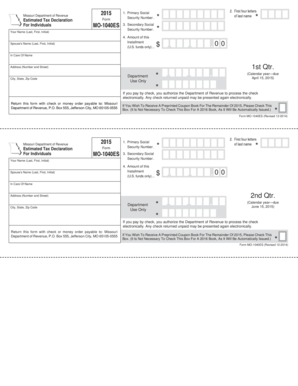
Completing the 2015 Form MO 1040ES is essential for individuals in Missouri who are required to declare estimated tax payments. This guide offers clear, step-by-step instructions to assist you in filling out the form accurately and efficiently online.
Follow the steps to fill out the form correctly.
- Click ‘Get Form’ button to obtain the form and open it in the editor.
- Enter your name in the respective fields, including your last name, first name, and middle initial, if applicable.
- Input your spouse’s name in the designated fields if filing jointly.
- Provide your primary Social Security number in Line 1. Ensure accuracy to prevent delays.
- Fill in the first four letters of your last name in Line 2, using all capital letters.
- If applicable, enter your spouse’s Social Security number in Line 3.
- Enter the amount of your installment payment in Line 4 as calculated from your estimated tax worksheet.
- Complete your mailing address in the space provided, including number and street, city, state, and zip code.
- Review the completed form for any errors or omissions to ensure all provided information is accurate.
- Save your changes, download the completed form, or print it for mailing. Be sure to return it with a check or money order payable to the Missouri Department of Revenue.
Complete your tax documentation online today to ensure compliance with estimated tax requirements.
Get the current filing year's forms, instructions, and publications for free from the Internal Revenue Service (IRS). Download them from IRS.gov. Order by phone at 1-800-TAX-FORM (1-800-829-3676)