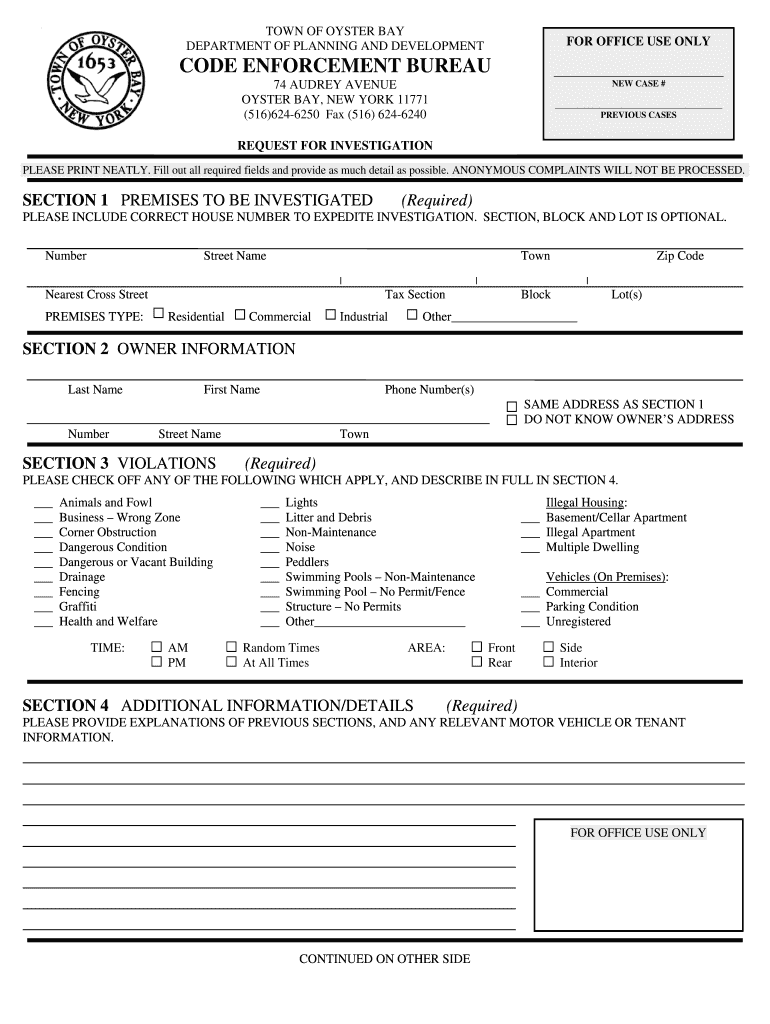
TOWN OF OYSTER BAY. DEPARTMENT OF PLANNING AND DEVELOPMENT. CODE ENFORCEMENT BUREAU ... INVESTIGATION. FOR OFFICE USE ONLY .

Open form follow the instructions

Easily sign the form with your finger

Send filled & signed form or save
How to fill out the Town Of Oyster Bay Code Enforcement online
Filling out the Town Of Oyster Bay Code Enforcement form online is a straightforward process that helps address and report violations. This guide offers step-by-step instructions to ensure you complete the form accurately and effectively.
Follow the steps to successfully complete the Code Enforcement form.
- Click ‘Get Form’ button to access the document and open it for editing.
- In section 1, you will need to provide detailed information about the premises to be investigated. Ensure that you include the correct house number, street name, and any optional details such as section, block, and lot numbers. Select the type of premises: residential, commercial, industrial, or other, and include the zip code.
- Move on to section 2, where you will input the owner’s information. Include the owner's last name, first name, and phone number. If the owner's address is the same as the premises, check the appropriate option, or indicate that you do not know the owner’s address.
- In section 3, check off any violations that apply to your report. The form includes various categories, such as animals and fowl, business zoning issues, dangerous conditions, and more. Make sure to select all relevant options to ensure a comprehensive report.
- Section 4 requires you to provide additional information and details about any illegal housing situations, such as basement apartments or multiple dwellings. Also indicate any vehicle-related issues present on the premises, specifying their conditions.
- Lastly, expand on the previous sections by providing thorough explanations. Include any relevant details regarding motor vehicle information or tenants that could assist in the investigation. Ensure that all information is clear and well-organized.
- After you have filled out all sections thoroughly, review the form for accuracy. You can then save your changes, download a copy for your records, or print the completed form for submission.
Take the next step in submitting your concerns by completing the Town Of Oyster Bay Code Enforcement form online.
Experience a faster way to fill out and sign forms on the web. Access the most extensive library of templates available.
Related content
View local, state, and federal government laws, regulations, and codes. ... Village of ·...
The town is starting to enforce the code.” The dynamics are a little different in...
Enforcement's new strategic plan that was developed in fiscal year 2005. ... The Princeton...
Get answers to your most pressing questions about US Legal Forms API.
How tall can a fence be in the town of Oyster Bay?
Submit two (2) copies of a standard building permit application completely filled out and signed and notarized by the property Owner. 2. Submit two (2) copies of recent property survey indicating location and height of fence and any gate locations. Maximum fence height permitted is 6'-6” measured to existing grade.
Are chickens allowed in town of Oyster Bay?
No building, structure or premises shall be erected, altered or used in any residence district for the housing, feeding or harboring of pigeons, fowl, swine, goats, horses, rabbits, foxes, mink and bees, except when authorized by special use permit from the Board of Appeals.
Can I have chicken in Long Island?
0:00 1:58 Backyard Chicken Law Frustrates Some On Long Island - YouTube YouTube Start of suggested clip End of suggested clip And odor-free. For five years in her backyard. Provide a dozen fresh eggs every day. And aMoreAnd odor-free. For five years in her backyard. Provide a dozen fresh eggs every day. And a sustainable way to feed her family it's not just having a pet it's having. Food.
Can you have chickens in Huntington NY?
No person shall keep, maintain, house or possess more than eight (8) chickens or ducks or any combination thereof on any premises.
Can you have chickens in Nassau County FL?
Officials in Nassau County and in its most historic city both looked at whether residents in residentially zoned areas can have chickens. Fernandina Beach City Manager Joe Gerrity says the city ordinance only allows a resident to have one chicken if they ask for, then receive, a permit from his office.
How do I contact Town of Oyster Bay?
Town Addresses & Phone Guide – Town of Oyster Bay. Click each department below to access contact information. For any additional questions please call the office of Public Information at (516) 624-6380. *Note: It would help us to know the nearest house number or cross street to the light you are calling about.
How do I file a complaint with the City of Oyster Bay?
(516) 624-6200 ext. 4. Code Enforcement Bureau is charged with the enforcement of all codes, rules and regulations pertaining to zoning, housing and public safety. It is expressly designed to handle requests of citizens regarding possible violations.
Use professional pre-built templates to fill in and sign documents online faster. Get access to thousands of forms.
If you believe that this page should be taken down, please follow our DMCA take down process here.