Loading
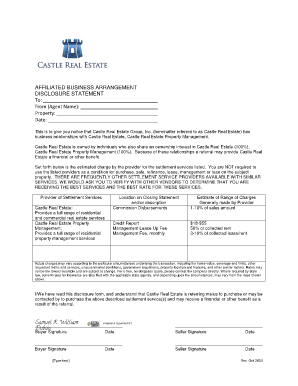
Get Affiliated Business Arrangement Disclosure Statement To: From
How it works
-

Open form follow the instructions
-

Easily sign the form with your finger
-

Send filled & signed form or save
How to fill out the AFFILIATED BUSINESS ARRANGEMENT DISCLOSURE STATEMENT online
Filling out the Affiliated Business Arrangement Disclosure Statement is a crucial step in ensuring transparency in real estate transactions. This guide will provide you with clear, user-friendly instructions to help you complete this document accurately and confidently.
Follow the steps to complete the document effectively.
- Press the ‘Get Form’ button to access the Affiliated Business Arrangement Disclosure Statement. This allows you to view and edit the form conveniently.
- In the 'To' field, enter the name of the recipient who will receive this disclosure. Ensure that this is accurately filled to maintain clarity.
- In the 'From' field, indicate the name of the agent or party providing this disclosure. It is essential to include full names for proper acknowledgment.
- Next, fill in the 'Property' field with the specific address or details of the property in question. This information is crucial for the context of the transaction.
- In the 'Date' field, input the current date when the form is being completed, ensuring that this aligns with the transaction timeline.
- Review the section that outlines the business relationships. Ensure that the information regarding Castle Real Estate Group, Inc. and its affiliated entities is accurately presented.
- In the 'Provider of Settlement Services' section, verify that the details about the services offered by Castle Real Estate and Castle Real Estate Property Management are correct.
- Fill out the estimated charges for services as listed. These should reflect the information provided and can impact the user's decision.
- Read the disclosure carefully. Ensure that you understand the implications of the referral and potential benefits as outlined in the statement.
- Have all parties involved sign the document in the designated ‘Buyer Signature’ and ‘Seller Signature’ sections. Include the date of each signature to ensure validity.
- Finally, you can save your changes, download a copy for your records, print the document, or share it as necessary.
Complete your documents online today for a smooth and efficient process.