Loading
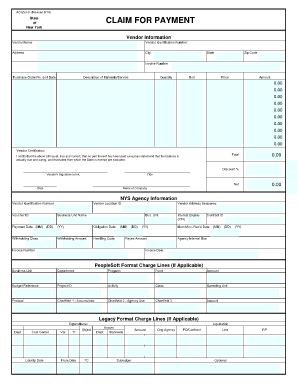
Get Claim For Payment
How it works
-

Open form follow the instructions
-

Easily sign the form with your finger
-

Send filled & signed form or save
How to fill out the CLAIM FOR PAYMENT online
Filling out the Claim for Payment form can seem complicated, but with clear guidance, you can easily complete it online. This guide will walk you through each section of the form, ensuring you provide all necessary information accurately.
Follow the steps to successfully complete your Claim for Payment form.
- Click ‘Get Form’ button to obtain the form and open it in your preferred editor.
- Begin by filling in the vendor information. This includes entering the vendor name, vendor identification number, and full address (including city, state, and zip code).
- Next, provide the invoice number, purchase order number, and date, as well as a description of the materials or services provided.
- In this section, indicate the quantity, unit price, and calculate the total amount for each item listed. Ensure all fields are accurately filled to reflect the correct totals.
- In the vendor certification area, you will need to certify that the bill is just, true, and correct. Make sure to verify that the total amount is accurate before signing.
- Provide your signature in ink, along with your title and the date of signing.
- Fill in the NYS agency information, including the vendor identification number and any relevant codes.
- If applicable, complete any additional details in the ‘PeopleSoft Format Charge Lines’ or ‘Legacy Format Charge Lines’ sections.
- After reviewing the entire form for accuracy, you can save your changes, download, print, or share the completed form as needed.
Start completing your Claim for Payment online today!
0:45 4:48 Insert Calculations and Formulas into Word | Microsoft Word Tutorials YouTube Start of suggested clip End of suggested clip Here. If i click in the cell. Here go up to layout. And go along to formula. Now automatically thisMoreHere. If i click in the cell. Here go up to layout. And go along to formula. Now automatically this dialog box will appear.