Loading
Form preview
  • US Legal Forms
  • Other Templates
  • More Forms
  • More Uncategorized Forms
  • Seed Enterprise Investment Scheme Compliance Statement

Get Seed Enterprise Investment Scheme Compliance Statement

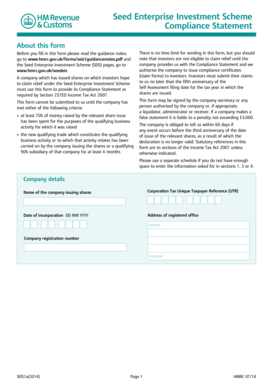
Seed Enterprise Investment Scheme Compliance Statement About this form Before you fill in this form please read the guidance notes, go to www.hmrc.gov.uk/forms/seis1guidancenotes.pdf and the Seed.

How it works

  1. Open form

    Open form follow the instructions

  2. Easily sign form

    Easily sign the form with your finger

  3. Share form

    Send filled & signed form or save

How to fill out the Seed Enterprise Investment Scheme Compliance Statement online

Filling out the Seed Enterprise Investment Scheme Compliance Statement is essential for companies issuing shares under the scheme. This guide will provide step-by-step instructions on how to complete the form accurately and efficiently.

Follow the steps to fill out the Seed Enterprise Investment Scheme Compliance Statement online.

  1. Press the ‘Get Form’ button to access the form and open it in your document management system.
  2. Enter the company details including the name of the company issuing shares, its Corporation Tax Unique Taxpayer Reference (UTR), date of incorporation in the format DD MM YYYY, address of the registered office, company registration number, and postcode.
  3. Provide the share issue details by entering the date the shares were issued (DD MM YYYY) and listing the subscribers who will be claiming SEIS relief. Ensure only to include those investors to avoid restrictions on future fundraising.
  4. Describe the shares and their nominal value, along with the amount subscribed (£) and the number of shares issued. Sum these amounts and enter the total from any separate schedules.
  5. Indicate the qualifying business activity by stating whether the shares were issued to raise money for trade or research and development. Provide the name of any subsidiary company involved and confirm if the trade has already started with the appropriate date.
  6. In the company funding section, detail any prior SEIS shares issued before the current share issue date and list amounts received by the company within the last three years that fall under the EC State aid de minimis regulation.
  7. Complete the other information section by listing any share capital held by the subscribers at the time of share issuance, naming any companies that were 51% subsidiaries, and detailing spending of at least 70% of the raised funds.
  8. Make the declaration, ensuring that all required conditions are met at the time of share issue. This includes confirming the shares were issued for genuine purposes, that qualifying conditions are met, and that all information is true and accurate.
  9. Print the completed form and sign the declaration. Once signed, submit the form to HM Revenue & Customs at the specified address.

Complete and submit your Seed Enterprise Investment Scheme Compliance Statement online to ensure compliance and secure investor relief.

Get form

Experience a faster way to fill out and sign forms on the web. Access the most extensive library of templates available.
Get form

Related content

EX-99.P.2 - SEC.gov
Client Investments in Securities Owned by Invesco Employees ... C. Annual Certification of...
Learn more
Quality Management for Seed Enterprises in...
verbatim and applied to a specific seed enterprise. ... 6.1.2 PQM shall complete and sign...
Learn more
Funding - Wikipedia
Funding is the act of providing resources to finance a need, program, or project. While...
Learn more

Related links form

NY MV-45U 2021 Madison College Health Screening Form 2013 NY MV-82ITPAL 2025 CA RI-AP001 - County Of Riverside 2024

Questions & Answers

Get answers to your most pressing questions about US Legal Forms API.

Contact support

The Seed Enterprise Investment Scheme ( SEIS ) is one of 4 venture capital schemes ― check which is appropriate for you.

The scheme: offers tax reliefs to individual investors who buy new shares in your company. helps your company to raise money when it's starting to trade.

You must keep the shares for at least three years If you sell or dispose of your shares in a company before the third anniversary of your share issue, your SEIS relief can be withdrawn or reduced. You must hold your shares for a minimum of three years to receive the full SEIS tax benefits.

The EIS1 compliance statement is the company's application to HMRC. The EIS2 form is HMRC's official approval of the company's EIS status (and contains the UIR number your investors need to claim the tax relief) The EIS3 compliance certificates give investors a way to claim their tax relief.

SEIS shares are treated like any other shares you buy in the stock market. This means when you die they form part of your estate and can be passed on to whomever you choose.

Enterprise Investment Schemes (EIS) and Seed Enterprise Investment Schemes (SEIS) are investment schemes designed to encourage investment in small or medium sized companies. They do this by offering tax reliefs to individual investors who buy new shares in your company.

You can only apply for SEIS Compliance if you have been trading for 4 months (R&D is excluded - so you need to have started trading) OR spent 70% of the SEIS funds. You can apply for EIS Compliance if you have either been trading OR doing R&D intended to lead to the trade for more than 4 months.

SEIS (Seed Enterprise Investment Scheme) and EIS (Enterprise Investment Scheme) are tax-relief schemes set up by HMRC to encourage and support individual investment in early stage, higher risk companies.

Get This Form Now!

Use professional pre-built templates to fill in and sign documents online faster. Get access to thousands of forms.
Get form
If you believe that this page should be taken down, please follow our DMCA take down processhere.
Get Seed Enterprise Investment Scheme Compliance Statement
Get form
  • Adoption
  • Bankruptcy
  • Contractors
  • Divorce
  • Home Sales
  • Employment
  • Identity Theft
  • Incorporation
  • Landlord Tenant
  • Living Trust
  • Name Change
  • Personal Planning
  • Small Business
  • Wills & Estates
  • Packages A-Z
  • Affidavits
  • Bankruptcy
  • Bill of Sale
  • Corporate - LLC
  • Divorce
  • Employment
  • Identity Theft
  • Internet Technology
  • Landlord Tenant
  • Living Wills
  • Name Change
  • Power of Attorney
  • Real Estate
  • Small Estates
  • Wills
  • All Forms
  • Forms A-Z
  • Other Templates
  • Legal Hub
  • About Us
  • Help Portal
  • Legal Resources
  • Blog
  • Affiliates
  • Contact Us
  • Delete My Account
  • Site Map
  • Industries
  • Forms in Spanish
  • Localized Forms
  • State-specific Forms
  • Forms Kit
  • Real Estate Handbook
  • All Guides
  • Notarize
  • Incorporation services
  • For Consumers
  • For Small Business
  • For Attorneys
  • USLegal
  • FormsPass
  • pdfFiller
  • signNow
  • altaFlow
  • DocHub
  • Instapage
Form Packages
  • Adoption
  • Bankruptcy
  • Contractors
  • Divorce
  • Home Sales
  • Employment
  • Identity Theft
  • Incorporation
  • Landlord Tenant
  • Living Trust
  • Name Change
  • Personal Planning
  • Small Business
  • Wills & Estates
  • Packages A-Z
Form Categories
  • Affidavits
  • Bankruptcy
  • Bill of Sale
  • Corporate - LLC
  • Divorce
  • Employment
  • Identity Theft
  • Internet Technology
  • Landlord Tenant
  • Living Wills
  • Name Change
  • Power of Attorney
  • Real Estate
  • Small Estates
  • Wills
  • All Forms
  • Forms A-Z
  • Other Templates
Customer Service
  • Legal Hub
  • About Us
  • Help Portal
  • Legal Resources
  • Blog
  • Affiliates
  • Contact Us
  • Delete My Account
  • Site Map
  • Industries
  • Forms in Spanish
  • Localized Forms
  • State-specific Forms
  • Forms Kit
Legal Guides
  • Real Estate Handbook
  • All Guides
Prepared for you
  • Notarize
  • Incorporation services
Our Customers
  • For Consumers
  • For Small Business
  • For Attorneys
Our Sites
  • USLegal
  • FormsPass
  • pdfFiller
  • signNow
  • altaFlow
  • DocHub
  • Instapage
Social Media
Call us now toll free:
+1 833 426 79 33
As seen in:
© Copyright 1999-2026 airSlate Legal Forms, Inc. 17 Station Street, Ste. 203, Brookline, MA 02445
  • Your Privacy Choices
  • Terms of Service
  • Privacy Notice
  • Content Takedown Policy
  • Bug Bounty Program