Loading
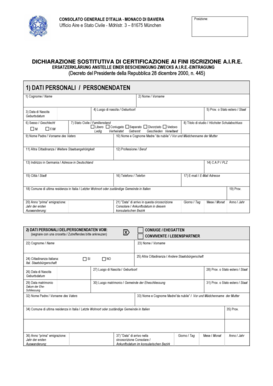
Get Aire Monaco Di Baviera
How it works
-

Open form follow the instructions
-

Easily sign the form with your finger
-

Send filled & signed form or save
How to fill out the Aire Monaco Di Baviera online
Filling out the Aire Monaco Di Baviera form is an essential step for Italian nationals residing in Monaco di Baviera. This guide provides a clear and supportive overview of each component of the form, ensuring users can easily navigate the process.
Follow the steps to complete the form effectively.
- Press the ‘Get Form’ button to access the Aire Monaco Di Baviera form and open it for editing.
- Begin with section 1, which contains personal data. Fill out your surname in the designated field labeled ‘Cognome / Name’.
- Enter your first name under ‘Nome / Vorname’.
- Provide your place of birth by entering it in ‘Luogo di nascita / Geburtsort’.
- Fill in your date of birth in the format requested under ‘Data di Nascita / Geburtsdatum’.
- Indicate your province or foreign state in the field labeled ‘Prov. o Stato estero / Staat’.
- Specify your gender in the section ‘Sesso / Geschlecht’ by selecting either M for male or F for female.
- Select your marital status from the options provided in ‘Stato Civile / Familienstand’, such as single or married.
- Complete educational qualifications in the ‘Titolo di studio / Höchster Schulabschluss’ section.
- Provide your father's name and your mother's maiden name in the respective fields.
- If applicable, indicate any other citizenships you hold in ‘Altra Cittadinanza / Weitere Staatsangehörigkeit’.
- Fill out your profession under the ‘Professione / Beruf’ section.
- Complete your address in Germany, ensuring to fill in each part, including C.A.P / PLZ, city, telephone, and email.
- Indicate your last municipality of residence in Italy.
- Note the year of your initial emigration.
- Fill in your date of arrival in the consular area as specified.
- Proceed to section 2 for additional personal data regarding your spouse or partner if applicable.
- Fill in information about any minor children following the prompts in section 3.
- Complete the electoral data in section 4 as required.
- If transferring from another consular district, indicate the respective embassy or consulate.
- Read and agree to the declaration regarding your Italian citizenship and submit your signature.
- Finally, review all completed information, save your changes, and prepare to download, print, or share the finalized form.
Complete your Aire Monaco Di Baviera form online today.
Industry-leading security and compliance
US Legal Forms protects your data by complying with industry-specific security standards.
-
In businnes since 199725+ years providing professional legal documents.
-
Accredited businessGuarantees that a business meets BBB accreditation standards in the US and Canada.
-
Secured by BraintreeValidated Level 1 PCI DSS compliant payment gateway that accepts most major credit and debit card brands from across the globe.