Loading
Get Pagamento F23 Online
How it works
-

Open form follow the instructions
-

Easily sign the form with your finger
-

Send filled & signed form or save
How to fill out the Pagamento F23 Online online
Filling out the Pagamento F23 Online form is essential for managing taxes, fees, and other payments accurately. This guide will walk you through the necessary steps involved in completing the form effectively and efficiently.
Follow the steps to complete your Pagamento F23 Online form.
- Click ‘Get Form’ button to access the Pagamento F23 Online form and open it for editing.
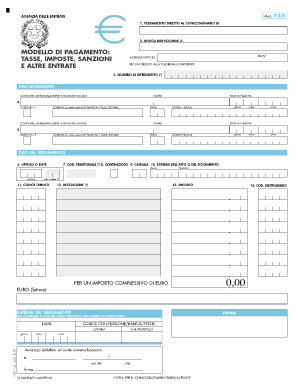
- Begin with section 1, where you'll specify the direct payment to the concessionaire. Ensure you provide all relevant details accurately.
- In section 2, input the irrevocable delegation information if applicable. This is vital for any third-party transactions.
- Fill in the model of payment. Indicate what taxes, fees, penalties, or other revenue the form pertains to, as necessary.
- In section 3, enter the reference number. This number helps identify your transaction within the relevant authority's records.
- Complete the personal information under the 'Dati Anagrafici' section. Include surname, date of birth, name, gender, place of birth, and fiscal code.
- Proceed to the 'Dati del Versamento' section. Here you will need to fill in the office or entity handling the payment, the territorial code, and the cause for the payment.
- Enter the tax code and description corresponding to your payment type. Make sure these match the requirements outlined for your payment.
- Input the payment amount in both numerical and written format. Be precise to avoid any discrepancies.
- Finalize your form by filling in the necessary payment reference details and any other additional information required at the bottom.
- Review all information to ensure accuracy, save your changes, and then proceed to download, print, or share your completed form.
Start filling out your documents online today for a streamlined process.