Loading
Get Warranty Work
How it works
-

Open form follow the instructions
-

Easily sign the form with your finger
-

Send filled & signed form or save
How to fill out the Warranty Work online
Completing the Warranty Work online is essential for ensuring your service request is processed efficiently. This guide provides step-by-step instructions to help you correctly fill out the form and submit it seamlessly.
Follow the steps to complete the Warranty Work form accurately.
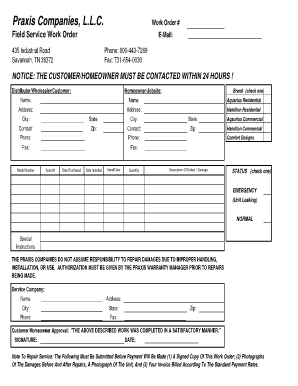
- Click ‘Get Form’ button to access the Warranty Work form and open it in your preferred editing tool.
- In the ‘Work Order #’ field, enter the unique reference number assigned to your request. This number is critical for tracking the status of your warranty work.
- Fill in the ‘E-Mail’ section with your contact email address, which enables effective communication regarding your warranty work.
- Provide the address of the job site in the appropriate fields under ‘Homeowner/Jobsite’. Include the name of the homeowner or designated contact person.
- Select the brand by checking one of the options such as ‘Aquarius Residential’ or ‘Hamilton Residential.’ This selection helps identify the equipment associated with the warranty claim.
- Record the model number and serial number of the product in the designated fields to ensure accurate identification.
- Indicate the purchase and installation dates. This information is vital for validating warranty eligibility.
- Describe the defect or damage in the ‘Description of Defect / Damage’ field, providing clear and concise details for the repair service team.
- Select the status of the work by checking either ‘EMERGENCY’ or ‘NORMAL,’ based on the urgency of the issue.
- Complete the ‘Service Company’ section with the name, address, city, state, zip code, phone number, and fax number of the service provider handling your request.
- Ensure the customer or homeowner approval section is signed and dated. This verification confirms that the described work will be completed satisfactorily.
- After completing all sections, make sure to save your changes. You may also choose to download, print, or share the form as needed for your records.
Take the next step and complete your Warranty Work request online today.
Parts not covered by a new vehicle bumper to bumper warranty are mainly wear items ie. parts of the vehicle that deteriorate through constant use. Not covered, are parts such as wipers, tires, brake pads, brake rotors, light bulbs, and window glass.