Loading
Get Ladder Permit Template
How it works
-

Open form follow the instructions
-

Easily sign the form with your finger
-

Send filled & signed form or save
How to fill out the Ladder Permit Template online
The Ladder Permit Template is an essential document for ensuring safety when working from a portable ladder. This guide provides a clear, step-by-step approach to filling out the form online, helping you to comply with safety regulations while protecting workers from fall hazards.
Follow the steps to complete the Ladder Permit Template online
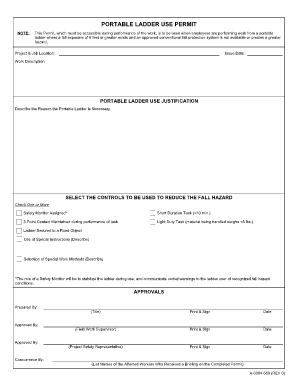
- Click ‘Get Form’ button to obtain the form and open it in the editor.
- Enter the project and job location in the designated field. Be specific to ensure clarity.
- Fill in the issue date when the permit is being created. This date is important for tracking purposes.
- Provide a detailed work description. This section should clearly outline the tasks that will be performed using the portable ladder.
- In the 'Portable ladder use justification' section, describe the reason the portable ladder is necessary for the specific task.
- Select the controls to be utilized to reduce fall hazards by checking one or more options available in the form. Make sure to consider safety measures like having a safety monitor or maintaining three-point contact.
- If applicable, provide any special instructions or work methods in their respective sections, ensuring all information is clear and detailed.
- Complete the approval section by entering the names and titles of individuals preparing, approving, and concurring with the permit. Each person should print and sign their name and date the form accordingly.
- Lastly, list the names of affected workers who have received a briefing on the completed permit to ensure everyone is informed about the safety measures in place.
- After filling out all sections, save the changes, download the document, and consider printing or sharing it as required for compliance.
Complete and submit the Ladder Permit Template online to ensure a safe working environment.
Related links form
To change the numbering alignment, go to Header & Footer > Page Number > Page Number. Choose the alignment you want and select OK.