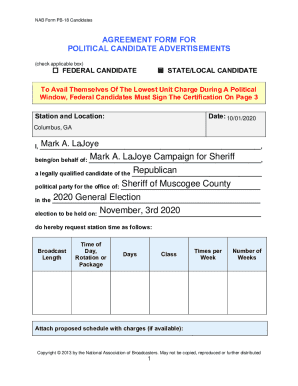
Political Broadcast Agreement Forms PB-18 NAB POLITICAL ADVERTISING AGREEMENT FORMS (PB-18) TABLE OF CONTENTS USING THE FORMS PB-18 NAB AGREEMENT FORM FOR POLITICAL CANDIDATE ADVERTISEMENTS PB-18.
Open form follow the instructions
Easily sign the form with your finger
Send filled & signed form or save
How to fill out the Nab Pb 18 Fillable online
The Nab Pb 18 Fillable form is essential for organizing political advertising agreements and adheres to FCC record retention requirements. This guide provides clear and friendly instructions to assist users in navigating the form effectively.
Follow the steps to fill out the Nab Pb 18 Fillable form with ease.
- Press the ‘Get Form’ button to access the form and open it for editing.
- Begin by indicating the type of advertisement by checking the appropriate box for either a federal or state/local candidate.
- Input the station name and location, as well as the date of the request.
- Fill in your details, stating your name and the name of the person or committee you represent. Include the political party and office for which you are running, as well as the election date.
- Specify the broadcast details by providing information about the length, time of day, rotation or package, number of days, class, times per week, and number of weeks you are requesting.
- Attach a proposed schedule with related charges, if available.
- Certify that the payment for the broadcast time has been provided by the appropriate person or entity, ensuring that this information is accurate.
- Sign the document and include the date. A station representative must also sign and indicate whether the request has been accepted wholly or partially.
- Complete the necessary certification if you are a federal candidate, indicating whether the programming refers to an opposing candidate and providing the required details.
- For issue advertisements, follow similar steps but ensure to specify if the programming communicates a political matter of national importance. Fill out the agreed-upon schedule accordingly.
- Once all fields are filled in, review the form for accuracy. Save, download, print, or share the completed form as needed before closing the file, ensuring that all information is preserved.
Start completing your Nab Pb 18 Fillable form online to ensure your political advertisement agreements are properly managed.
Experience a faster way to fill out and sign forms on the web. Access the most extensive library of templates available.
Related content
Forms with this symbol are fillable in the Acrobat reader. ... PDF, CORES Registration...
15. 4 Detecting monopole classes. 18. The4-dimensionalequations . ... invariants [42] lead...
Get answers to your most pressing questions about US Legal Forms API.
How do you write a formula in Stack Exchange?
There are two basic types of formula: Inline formulas are surrounded by single dollar signs. For example, $f(x) = ax^2 + bx + c$ renders as f(x)=ax2+bx+c. Block formulas are surrounded by double dollar signs. For example, $$x = \frac{-b \pm \sqrt{b^2 - 4ac} }{2a}$$ renders, on a separate line, as x=−b±√b2−4ac2a.
How to solve equations?
0:29 25:04 Algebra - How To Solve Equations Quickly! - YouTube YouTube Start of suggested clip End of suggested clip So we need to divide both sides by 3.. So x is 12 divided by 3 which is 4. And this is the answer.MoreSo we need to divide both sides by 3.. So x is 12 divided by 3 which is 4. And this is the answer. Here's another example that you could try 4x plus 3 is equal to 19..
How do you continue an equation on the next line in LaTeX?
Insert a double backslash to set a point for the equation to be broken. The first part will be aligned to the left and the second part will be displayed in the next line and aligned to the right.
How do you split an equation in LaTeX?
By using the align environment instead of equation environment, along with breakline command. For example, say you want to break the following equation into two lines, You can do so by using the align environment as follows: \begin{align}
How do you structure an equation?
How to Write an Equation Read the entire problem several times. Look for keywords like more, less, is, etc. Replace the keywords with their mathematical operations and shorten the words to variables. ... Solve the resulting equation. Answer the problem clearly in a complete sentence.
How do you write equations in Word?
If you need to use an equation, add or write it in Word. Select Insert > Equation or press Alt + =. To use a built-in formula, select Design > Equation. To create your own, select Design > Equation > Ink Equation. Use your finger, stylus, or mouse to write your equation.
What is the rule for equations?
0:17 3:56 Addition Rule And Multiplication Rule How To Solve for Equations YouTube Start of suggested clip End of suggested clip We can add or subtract. Any same number from both sides of the equation. So we could add say 15 toMoreWe can add or subtract. Any same number from both sides of the equation. So we could add say 15 to both sides of the equation. And doing that the equation would now be x plus 4 plus 15 equals 12 plus.
How do you lay out equations?
How do I write equations and formulas? Center each equation or formula on a separate line. If more than one line in length, the equation should be broken at the end of a unit, as before a plus or minus sign. Place all of the equation on a single page. Allow four lines above and below the equation.
Use professional pre-built templates to fill in and sign documents online faster. Get access to thousands of forms.
If you believe that this page should be taken down, please follow our DMCA take down process here.