Loading
Get Ad-435 - Nfc Usda
How it works
-

Open form follow the instructions
-

Easily sign the form with your finger
-

Send filled & signed form or save
How to fill out the AD-435 - Nfc Usda online
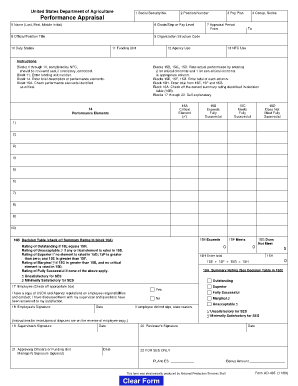
The AD-435 - Nfc Usda form is an essential document used by the United States Department of Agriculture for performance appraisal. Completing this form accurately is crucial for effective performance evaluation, and this guide will help you navigate each section with clarity.
Follow the steps to fill out the AD-435 - Nfc Usda form online.
- Press the ‘Get Form’ button to obtain the form and open it in your editing program.
- Begin by filling out the first ten fields. These include the social security number, position number, pay plan, occupation series, and identifying information about the employee and their performance appraisal. Ensure this information is accurate, as it is typically prefilled by the NFC.
- Review block 11 to enter the funding unit number and make any necessary corrections to the information provided by NFC.
- In block 14, include a brief description of the performance elements that will be evaluated.
- For blocks 15A through 15D, assess the performance elements by entering a rating of 2 for critical elements and 1 for non-critical elements. Ensure that your evaluations are honest and reflective of the employee’s actual performance.
- In blocks 15E, 15F, and 15G, calculate the totals for the columns respectively. After these calculations, enter the combined total in block 15H.
- Check off the appropriate summary rating in block 16A, consulting the decision table in block 16B for guidance on which rating accurately reflects the employee's performance.
- Blocks 17 through 22 are for signatures and final confirmations. Ensure that the employee reviews this section, checks a confirmation box regarding USDA regulations, and signs their name along with the date.
- The supervisor, reviewing official, and optional funding unit manager must also sign and date the appropriate fields in blocks 19 through 21.
- Once all relevant fields are completed and verified, users can save the changes, download the file, print it for physical submission, or share it as necessary.
Complete your documents online today for an efficient and organized completion process.
DPMAP is the acronym for DOD Performance Management and Appraisal Program. DPMAP is a three-tiered performance management program with the rating levels of "Level 5 -- Outstanding", "Level 3 - Fully Successful" and "Level 1 --Unacceptable". Each performance element is given a rating that corresponds to these levels.