Loading
Get Single Shipment Use Pour Envoi Unique ( ) - Purolator
How it works
-

Open form follow the instructions
-

Easily sign the form with your finger
-

Send filled & signed form or save
How to use or fill out the Single Shipment Use Pour Envoi Unique () - Purolator online
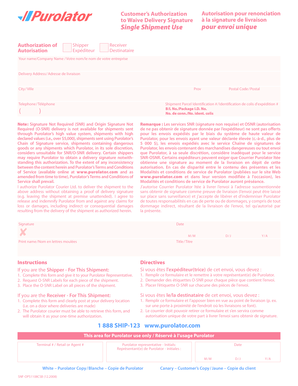
Filling out the Single Shipment Use Pour Envoi Unique form online is a straightforward process designed to facilitate hassle-free shipping without the need for a delivery signature. This guide will walk you through each step to ensure you complete the form correctly.
Follow the steps to fill out the form accurately.
- Click ‘Get Form’ button to obtain the form and open it in your document editor.
- In the 'Shipper' section, enter your name or company name in the designated field.
- Provide the delivery address, including the street address, city, province, postal code, and telephone number.
- Fill in the shipment parcel identification number in the appropriate field to uniquely identify your shipment.
- Read the note about delivery signature requirements to ensure your shipment is eligible for signature waiver.
- In the authorization section, confirm that you authorize Purolator Courier Ltd. to deliver the shipment without obtaining a proof of delivery signature.
- Sign and date the form, ensuring that the printed name and title are also clearly provided.
- After completing the form, ensure all your details are correct, then save the changes.
- Download, print, or share the completed form as needed.
Complete your shipping documents online for a seamless shipping experience.
Related links form
Someone at the recipient's address must sign for the delivery. Direct signature deliveries are made to the address on the mailing label, not to an individual recipient.