Loading
Get Orion Iso Timesheets
How it works
-

Open form follow the instructions
-

Easily sign the form with your finger
-

Send filled & signed form or save
How to fill out the Orion Iso Timesheets online
This guide provides clear and supportive instructions on filling out the Orion Iso Timesheets online. Whether you are a new user or have experience in timesheet management, this resource will help ensure accuracy and compliance in your reporting.
Follow the steps to complete your timesheet efficiently.
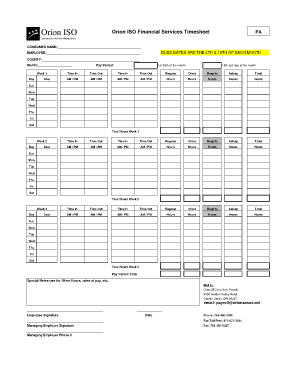
- Press the 'Get Form' button to access the Orion Iso Timesheets. This will allow you to open the form in your preferred editor for completion.
- Begin by entering the consumer name in the designated field at the top of the form. This ensures proper identification of the services provided.
- Next, fill in your name under the employee field and indicate the county in which services were rendered. This information helps in tracking and processing timesheet submissions.
- Select the correct month for which you are reporting your hours by entering it in the appropriate section.
- Proceed to the week sections. For each day of the week, input the dates and the respective time in and time out for both regular and other types of hours worked. Ensure to convert your hours into AM/PM format based on when the work commenced.
- At the end of each week section, calculate the total hours worked and enter this value in the 'Total Hours Week' field.
- Continue this process for each of the subsequent weeks indicated on the form, making sure to provide totals for each week.
- Once all weeks are completed, ensure to summarize total working hours for the entire pay period at the designated 'Pay Period Total' section.
- If there are any additional notes regarding other hours or pay rates, fill this in the 'Special Notes' section, which provides space for clarifications.
- Lastly, sign the form by adding your employee signature along with the date. Also, ensure that the managing employer provides their signature and contact information where required.
- After reviewing the completed form for accuracy, proceed to save changes, download the document, and as needed, print or share it to submit it to the payroll department.
Complete your Orion Iso Timesheets online today to ensure timely and accurate payroll processing.
Related links form
How Can Someone Contact Orion ISO Directly? To learn more about Orion ISO or schedule an intake meeting, please contact our Intake Coordinator at 763-442-2118. You may also call our Program Administrator at 763-450-5041.