Loading
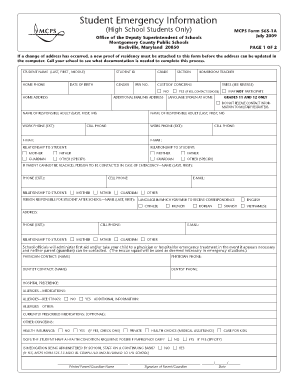
Get Mcps Student Emergency Information Form
How it works
-

Open form follow the instructions
-

Easily sign the form with your finger
-

Send filled & signed form or save
How to fill out the Mcps Student Emergency Information Form online
Filling out the Mcps Student Emergency Information Form online is a crucial step in ensuring that your child's school has all necessary information in case of emergencies. This guide provides clear, step-by-step instructions to help you complete the form accurately and efficiently.
Follow the steps to complete the form online.
- Click 'Get Form' button to obtain the form and open it for editing.
- Begin by entering the student's full name, including last, first, and middle names. Also, provide the student ID and grade level. Ensure accuracy in this section as it identifies the student within the school system.
- Fill in the home phone number and date of birth, followed by the home address and school bus number. If there is an additional mailing address, provide that information as well.
- Indicate any custody concerns by checking the relevant box. If applicable, ensure to attach proof of residency for address changes.
- List the names and contact information of two responsible adults. Include their work and cell phone numbers, email addresses, and their relationship to the student.
- If the primary guardians cannot be reached during an emergency, provide the name and contact details of an emergency contact who should be notified.
- Complete the section regarding the person responsible for the student after school hours and choose the preferred language for correspondence.
- Provide the names and contact information of the student's physician and dentist. Indicate any hospital preference in case of emergencies.
- Detail any allergies or current prescribed medications the student may have. This information is vital for emergency medical responders.
- If applicable, indicate whether the student has a health condition requiring possible emergency care and whether medication is administered by school staff.
- Finish by entering the printed name of the parent or guardian, signing the form, and providing the date.
- Review all entries for accuracy. Once completed, save changes, and you may choose to download, print, or share the form as needed.
Complete the Mcps Student Emergency Information Form online to ensure your child's safety.
Consortia/Choice Through the Choice process, students and their parents complete a form identifying their school preference. While most students get their first choice, it is not guaranteed.