Loading
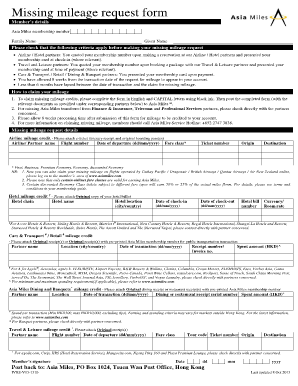
Get Missing Mileage Request Form - Asia Miles
How it works
-

Open form follow the instructions
-

Easily sign the form with your finger
-

Send filled & signed form or save
How to fill out the Missing Mileage Request Form - Asia Miles online
This guide provides a clear and detailed explanation of how to complete the Missing Mileage Request Form for Asia Miles online. By following these instructions, users will be able to navigate the form effectively and claim their missing miles with confidence.
Follow the steps to accurately complete the Missing Mileage Request Form
- Click ‘Get Form’ button to obtain the form and open it in your preferred document editor.
- Begin by entering your member’s details, including your Asia Miles membership number, family name, and given name. Ensure all information is accurate to avoid processing delays.
- Next, check the eligibility criteria listed before making your missing mileage request to ensure you meet all requirements.
- Fill in the relevant sections depending on whether you are claiming airline, hotel, car, or dining mileage credits. Each section requires specific documentation, which should be attached accordingly.
- For airline mileage claims, provide details such as the partner airline name, flight number, date of departure, fare class, and ticket number. Attach the e-ticket itinerary and original boarding pass.
- For hotel mileage claims, include the hotel chain, hotel name, check-in and check-out dates, and hotel bill number. Attach the original hotel bill.
- For car and retail mileage claims, fill in the partner name, date of transaction, and receipt number while attaching the original receipts.
- For dining or banquet mileage claims, provide the partner name, date of transaction, and the receipt serial number. Attach the original receipt with the membership number.
- After completing the form, review all entries for accuracy. Sign and date the form at the bottom before proceeding.
- Once all steps are completed and reviewed, save changes to your document, download it, print it, or share it as needed. Prepare to submit via postal service to the address provided.
Complete your Missing Mileage Request Form online today to ensure your missing miles are credited.
How do I claim missing Status Points and/or Asia Miles? To claim missing air mileage, log on to your account at .cathaypacific.com. Visit "Account overview" under "Member account"," Manage your miles” and “Claim missing Status Points and/or Asia Miles” to complete a Missing Mileage Request Form online.