Loading
Form preview
  • US Legal Forms
  • Form Library
  • More Forms
  • More Uncategorized Forms
  • Carta De Poder - Nyc.gov - Nyc

Get Carta De Poder - Nyc.gov - Nyc

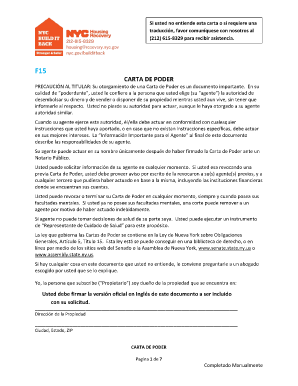
Programa NYC Build it Back administrado por la Ciudad de Nueva York. Si hay un ... Floor, New York, NY 10007 y/o solicit ndolas de mi Agente. Aceptaci n por .

How it works

  1. Open form

    Open form follow the instructions

  2. Easily sign form

    Easily sign the form with your finger

  3. Share form

    Send filled & signed form or save

How to fill out the CARTA DE PODER - NYC.gov - Nyc online

This guide provides clear and comprehensive instructions on how to fill out the CARTA DE PODER, a crucial legal document. Whether you are new to legal forms or seeking to complete this specific document, this step-by-step approach will support you through the process.

Follow the steps to accurately complete the form.

  1. Click the ‘Get Form’ button to obtain the document and open it for editing.
  2. Begin by entering the address of the property for which you are granting power of attorney. Be sure to include the complete address, city, state, and ZIP code.
  3. In the designated section, clearly write the name of your agent, along with their phone number, mailing address, email address, city, state, fax number, and ZIP code.
  4. Next, provide a detailed description of the powers you are granting to your agent in connection with the NYC Build It Back program. Specify the scope of duties and limitations, if any.
  5. Indicate if there are any prior powers of attorney that need to be revoked. This may require attaching additional documentation.
  6. Review the notification section to ensure that your agent will receive all communications related to the program, and provide instructions for how you would like to request copies.
  7. After completing all sections, sign the document. Remember that a notary public must witness your signature.
  8. Finally, review the completed form for accuracy. You can then save your changes, download, print, or share the completed document as needed.

Complete your CARTA DE PODER online to ensure your legal rights are properly documented.

Get form

Experience a faster way to fill out and sign forms on the web. Access the most extensive library of templates available.
Get form

Related content

carta de poder - NYC.gov
PRECAUCIÓN AL TITULAR: Su otorgamiento de una Carta de Poder es un documento importante...
Learn more
Servicios de Educación Especial para Preescolar...
https://www.schools.nyc.gov/special-education/preschool-to-age-21/moving-to-preschool...
Learn more
Gobierno de la ciudad de Nueva York - Government...
7 days ago — Gobierno de la ciudad de Nueva York - Government of New York City ... de...
Learn more

Related links form

Licensure Statutes And Administrative Rules CCSD#2 AUTHORIZATION FOR RELEASE OF ALCOHOL AND DRUG TESTING INFORMATION ACLS Provider Application Antineoplastic Drug Order Form

Questions & Answers

Get answers to your most pressing questions about US Legal Forms API.

Contact support

Click or tap the page at the beginning of a section. Select Layout > Breaks > Next Page. Double-click the header or footer on the first page of the new section. Click Link to Previous to turn it off and unlink the header or footer from the previous section.

Add a standard or customized header or footer Go to Insert > Header or Footer. Choose from a list of standard headers or footers, go to the list of Header or Footer options, and select the header or footer that you want. ... When you're done, select Close Header and Footer or press Esc.

Here are a few common elements to include in your footer: A call to action (CTA) Calls to action direct site visitors to, well, take action. ... Contact information. ... Locations or maps. ... Links to your social accounts. ... Newsletter signup forms. ... Popular posts or articles. ... Legal information. ... Links to critical pages.

Use headers and footers to add a title, date, or page numbers to every page in a document.

A footer is text such as a name or page number that can be automatically displayed at the bottom of each page of a printed document. Compare header. [computing] Page Mode shows headers, footers, footnotes and page numbers.

Footers are located in the margin area at the bottom of a page. Headers and footers generally contain document information, such as the file name, author, date created, page numbering and the like. This information is repeated on each page and thus enables the reader to easily navigate the document.

0:02 1:24 Insert a header or footer in Microsoft Word - YouTube YouTube Start of suggested clip End of suggested clip Select one of the built-in formats. And now the header or footer area will be editable. Then typeMoreSelect one of the built-in formats. And now the header or footer area will be editable. Then type the text you want. And select close header and footer to go back to editing your document.

A <footer> element typically contains: authorship information. copyright information. contact information. sitemap. back to top links. related documents.

Get This Form Now!

Use professional pre-built templates to fill in and sign documents online faster. Get access to thousands of forms.
Get form
If you believe that this page should be taken down, please follow our DMCA take down processhere.

Industry-leading security and compliance

US Legal Forms protects your data by complying with industry-specific security standards.
  • In businnes since 1997
    25+ years providing professional legal documents.
  • Accredited business
    Guarantees that a business meets BBB accreditation standards in the US and Canada.
  • Secured by Braintree
    Validated Level 1 PCI DSS compliant payment gateway that accepts most major credit and debit card brands from across the globe.
Get CARTA DE PODER - NYC.gov - Nyc
Get form
  • Adoption
  • Bankruptcy
  • Contractors
  • Divorce
  • Home Sales
  • Employment
  • Identity Theft
  • Incorporation
  • Landlord Tenant
  • Living Trust
  • Name Change
  • Personal Planning
  • Small Business
  • Wills & Estates
  • Packages A-Z
  • Affidavits
  • Bankruptcy
  • Bill of Sale
  • Corporate - LLC
  • Divorce
  • Employment
  • Identity Theft
  • Internet Technology
  • Landlord Tenant
  • Living Wills
  • Name Change
  • Power of Attorney
  • Real Estate
  • Small Estates
  • Wills
  • All Forms
  • Forms A-Z
  • Form Library
  • Legal Hub
  • About Us
  • Help Portal
  • Legal Resources
  • Blog
  • Affiliates
  • Contact Us
  • Delete My Account
  • Site Map
  • Industries
  • Forms in Spanish
  • Localized Forms
  • State-specific Forms
  • Forms Kit
  • Real Estate Handbook
  • All Guides
  • Notarize
  • Incorporation services
  • For Consumers
  • For Small Business
  • For Attorneys
  • USLegal
  • FormsPass
  • pdfFiller
  • signNow
  • altaFlow
  • DocHub
  • Instapage
Form Packages
  • Adoption
  • Bankruptcy
  • Contractors
  • Divorce
  • Home Sales
  • Employment
  • Identity Theft
  • Incorporation
  • Landlord Tenant
  • Living Trust
  • Name Change
  • Personal Planning
  • Small Business
  • Wills & Estates
  • Packages A-Z
Form Categories
  • Affidavits
  • Bankruptcy
  • Bill of Sale
  • Corporate - LLC
  • Divorce
  • Employment
  • Identity Theft
  • Internet Technology
  • Landlord Tenant
  • Living Wills
  • Name Change
  • Power of Attorney
  • Real Estate
  • Small Estates
  • Wills
  • All Forms
  • Forms A-Z
  • Form Library
Customer Service
  • Legal Hub
  • About Us
  • Help Portal
  • Legal Resources
  • Blog
  • Affiliates
  • Contact Us
  • Delete My Account
  • Site Map
  • Industries
  • Forms in Spanish
  • Localized Forms
  • State-specific Forms
  • Forms Kit
Legal Guides
  • Real Estate Handbook
  • All Guides
Prepared for you
  • Notarize
  • Incorporation services
Our Customers
  • For Consumers
  • For Small Business
  • For Attorneys
Our Sites
  • USLegal
  • FormsPass
  • pdfFiller
  • signNow
  • altaFlow
  • DocHub
  • Instapage
Social Media
Call us now toll free:
+1 833 426 79 33
As seen in:
© Copyright 1999-2026 airSlate Legal Forms, Inc. 3720 Flowood Dr, Flowood, Mississippi 39232
  • Your Privacy Choices
  • Terms of Service
  • Privacy Notice
  • Content Takedown Policy
  • Bug Bounty Program