Loading
Form preview
  • US Legal Forms
  • Other Templates
  • More Forms
  • More Uncategorized Forms
  • Fillable Dr 487

Get Fillable Dr 487

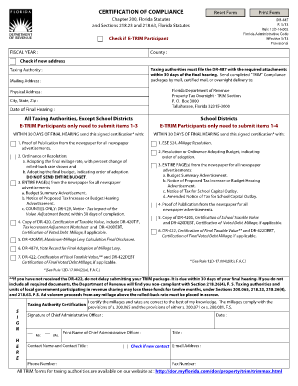
CERTIFICATION OF COMPLIANCE Reset Form Chapter 200, Florida Statutes and Sections 218.23 and 218.63, Florida Statutes DR-487 R. 5/13 Rule 12D-16.002 Florida Administrative Code Effective 5/13 Provisional.

How it works

  1. Open form

    Open form follow the instructions

  2. Easily sign form

    Easily sign the form with your finger

  3. Share form

    Send filled & signed form or save

How to fill out the Fillable Dr 487 online

The Fillable Dr 487 is a certification of compliance form that must be accurately completed by taxing authorities in Florida. This guide provides a step-by-step approach to help you navigate the form and submit it correctly, ensuring compliance with state regulations.

Follow the steps to effectively complete the Fillable Dr 487 online.

  1. Press the ‘Get Form’ button to access the Fillable Dr 487 and open it in your selected online editor.
  2. Indicate whether your organization is participating in E-TRIM by checking the appropriate box.
  3. Enter the fiscal year for which you are filing the form.
  4. Specify your county by typing the name in the designated field.
  5. If you have a new address, check the box to indicate this change.
  6. Complete the section for the taxing authority by providing the name and mailing address.
  7. Fill in the date of the final hearing, ensuring the date is accurate.
  8. If your authority is not a school district, only complete items 1-3. If it is a school district, include items 1-4, as specified in the guidance.
  9. Attach required documentation based on your classification as a taxing authority, ensuring all parts of the submission are included, such as proof of publication and properly adopted resolutions.
  10. After completing the form and checking for accuracy, save your changes. You may also download, print, or share the form as needed.

Complete the Fillable Dr 487 online to ensure compliance with Florida's regulations.

Get form

Experience a faster way to fill out and sign forms on the web. Access the most extensive library of templates available.
Get form

Related content

FMLA: Forms | U.S. Department of Labor
These forms are electronically fillable PDFs and can be saved electronically...
Learn more
Doctor of Acupuncture and Traditional Medicine...
Sep 2, 2020 — Doctor of Acupuncture and Traditional Medicine (DATM) program at DULA is...
Learn more
Adobe Acrobat Standard Help - Adobe Help Center
If you want to remove a folder or hard drive from the list of Favorite Places...
Learn more

Related links form

To All Prospective Proponents - App Gobierno Information And Instructions For Estimator Version 2 International Registration Plan Branch P - Ftp Dot State Tx C.S.H.B. 2319 80(R) BILL ANALYSIS C.S.H.B. 2319 By: Hochberg ...

Questions & Answers

Get answers to your most pressing questions about US Legal Forms API.

Contact support

How to Create Your Own Invoice Template in Excel Step 1: Open a New Blank Workbook. ... Step 2: Remove Gridlines. ... Step 3: Create an Invoice Header. ... Step 4: Add Invoice Payment Due Date & Invoice Number. ... Step 5: Enter the Client's Contact Information. ... Step 6: Create an Itemized List of Services and Products.

Regardless of the system you use, beginning with one and following a sequential order of numbers is the easiest way to keep track of invoices. For example, consider the invoice prefixes used earlier. Maintaining a sequential order helps companies avoid the confusion of duplicate invoice numbers.

A company can generate an invoice number sequence using whatever method works best, chronological or otherwise. It's important to choose a logical invoice number system to make tracking more manageable, but beyond that, you can number invoices however you choose.

The first series of numbers is the date, the second series of numbers is the customer number and the third series of numbers is the sequential unique identifier for the invoice. If you generate a second invoice on that date for that customer, the invoice number will be 20170630-4072-01. Use any date format you choose.

While it's up to you, most people would agree that the most convenient first invoice number should be '01'. Though, others prefer to add another zero, making the first number in the sequence '001'. From there, you can add unique identifiers such as customer numbers, a code for your business, or the date.

How to create an invoice number numbering your invoices sequentially, for example, INV00001, INV00002. starting with a unique customer code, for example, XER00001. including the date at the start of your invoice number, for example, 2023-01-001. combining the customer code and date, for example, XER-2023-01-001.

Consecutive or sequential invoice numbers help to ensure that each invoice is unique and each business transaction can be clearly and comprehensively organized and referenced – for accounting reasons as well as customer support.

How to create an invoice number numbering your invoices sequentially, for example, INV00001, INV00002. starting with a unique customer code, for example, XER00001. including the date at the start of your invoice number, for example, 2023-01-001. combining the customer code and date, for example, XER-2023-01-001.

Get This Form Now!

Use professional pre-built templates to fill in and sign documents online faster. Get access to thousands of forms.
Get form
If you believe that this page should be taken down, please follow our DMCA take down processhere.
Get Fillable Dr 487
Get form
  • Adoption
  • Bankruptcy
  • Contractors
  • Divorce
  • Home Sales
  • Employment
  • Identity Theft
  • Incorporation
  • Landlord Tenant
  • Living Trust
  • Name Change
  • Personal Planning
  • Small Business
  • Wills & Estates
  • Packages A-Z
  • Affidavits
  • Bankruptcy
  • Bill of Sale
  • Corporate - LLC
  • Divorce
  • Employment
  • Identity Theft
  • Internet Technology
  • Landlord Tenant
  • Living Wills
  • Name Change
  • Power of Attorney
  • Real Estate
  • Small Estates
  • Wills
  • All Forms
  • Forms A-Z
  • Other Templates
  • Legal Hub
  • About Us
  • Help Portal
  • Legal Resources
  • Blog
  • Affiliates
  • Contact Us
  • Delete My Account
  • Site Map
  • Industries
  • Forms in Spanish
  • Localized Forms
  • State-specific Forms
  • Forms Kit
  • Real Estate Handbook
  • All Guides
  • Notarize
  • Incorporation services
  • For Consumers
  • For Small Business
  • For Attorneys
  • USLegal
  • FormsPass
  • pdfFiller
  • signNow
  • altaFlow
  • DocHub
  • Instapage
Form Packages
  • Adoption
  • Bankruptcy
  • Contractors
  • Divorce
  • Home Sales
  • Employment
  • Identity Theft
  • Incorporation
  • Landlord Tenant
  • Living Trust
  • Name Change
  • Personal Planning
  • Small Business
  • Wills & Estates
  • Packages A-Z
Form Categories
  • Affidavits
  • Bankruptcy
  • Bill of Sale
  • Corporate - LLC
  • Divorce
  • Employment
  • Identity Theft
  • Internet Technology
  • Landlord Tenant
  • Living Wills
  • Name Change
  • Power of Attorney
  • Real Estate
  • Small Estates
  • Wills
  • All Forms
  • Forms A-Z
  • Other Templates
Customer Service
  • Legal Hub
  • About Us
  • Help Portal
  • Legal Resources
  • Blog
  • Affiliates
  • Contact Us
  • Delete My Account
  • Site Map
  • Industries
  • Forms in Spanish
  • Localized Forms
  • State-specific Forms
  • Forms Kit
Legal Guides
  • Real Estate Handbook
  • All Guides
Prepared for you
  • Notarize
  • Incorporation services
Our Customers
  • For Consumers
  • For Small Business
  • For Attorneys
Our Sites
  • USLegal
  • FormsPass
  • pdfFiller
  • signNow
  • altaFlow
  • DocHub
  • Instapage
Social Media
Call us now toll free:
+1 833 426 79 33
As seen in:
© Copyright 1999-2026 airSlate Legal Forms, Inc. 17 Station Street, Ste. 203, Brookline, MA 02445
  • Your Privacy Choices
  • Terms of Service
  • Privacy Notice
  • Content Takedown Policy
  • Bug Bounty Program