Loading
Get Cc Form
How it works
-

Open form follow the instructions
-

Easily sign the form with your finger
-

Send filled & signed form or save
How to fill out the Cc Form online
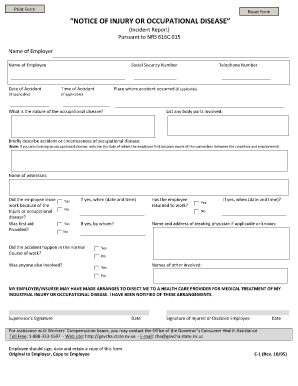
Completing the Cc Form online can streamline the process of reporting an injury or occupational disease. This guide provides clear, detailed instructions tailored to users at all levels of experience, ensuring that you can accurately fill out the form with confidence.
Follow the steps to complete the Cc Form online
- Press the ‘Get Form’ button to access the form and open it in your preferred editor.
- Begin by entering the name of the employer in the designated field. Ensure that the spelling is accurate to avoid any delays.
- Next, input the name of the employee who is reporting the injury or occupational disease.
- Provide the employee's social security number. Double-check this entry for accuracy.
- Indicate the date and time of the accident in the appropriate fields. If either is not applicable, you may skip this step.
- Fill in the telephone number for the employee, if applicable.
- Specify the place where the accident occurred. This helps in documenting the incident accurately.
- Describe the nature of the occupational disease, if applicable. Be as specific as possible.
- List any body parts that were involved in the incident to provide a clear record of injuries.
- Briefly describe the accident or the circumstances surrounding the occupational disease. If claiming an occupational disease, indicate the date when the employee first recognized the connection to their work.
- Name any witnesses to the incident in the provided space.
- Answer whether the employee left work due to the injury or disease, and state if first aid was provided.
- If first aid was provided, enter the date and time it was administered. Additionally, state who provided the first aid, if applicable.
- Document the name and address of the treating physician if known.
- Indicate if the accident occurred during the normal course of work and if anyone else was involved in the incident.
- Confirm whether the employee has returned to work after the incident.
- Complete the form by having both the supervisor and the injured employee sign and date it.
- Ensure that a copy of the completed form is retained by the employee. Save changes, download, or print the form for your records.
Start completing the Cc Form online today to ensure your injury or occupational disease is reported accurately.
A credit card authorization form will keep you and the buyer safe from any fraud or mishaps. When the user uses a credit card to make the payment then the details about the card are procured by swiping the credit card at the cash counter. ... However, this method is not safe for either the buyer or the seller.