Loading
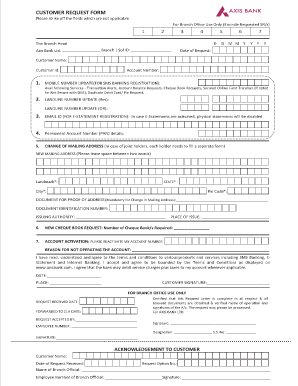
Get Axis Bank Customer Request Form
How it works
-

Open form follow the instructions
-

Easily sign the form with your finger
-

Send filled & signed form or save
How to fill out the Axis Bank Customer Request Form online
Filling out the Axis Bank Customer Request Form online is a straightforward process that allows users to manage various banking requests efficiently. This guide will walk you through each section of the form, ensuring that you understand what information is needed and how to provide it correctly.
Follow the steps to complete the form successfully.
- Press the ‘Get Form’ button to download the Axis Bank Customer Request Form and open it for editing.
- Begin by filling out the 'Date of Request' field. This helps in tracking your request efficiently.
- Input your 'Customer Name' and 'Customer Id' to identify your account. Ensure that these details match those in your banking records.
- Provide your 'Account Number.' This should be the account number with which you are seeking assistance.
- If you wish to update your mobile number for SMS banking, please fill in the section dedicated to 'Mobile Number Update.' You can also select additional services you wish to receive.
- Complete the 'Landline Number Update' sections if applicable. Fill out the residential and/or official landline numbers as needed.
- For 'Email ID,' specify the email you want registered for receiving e-statements. Remember, this will disable physical statement mailings.
- Input your Permanent Account Number (PAN) details in the designated area.
- If you need to change your mailing address, be sure to fill out the 'Change of Mailing Address' section thoroughly, including the new address, landmark, state, city, and pin code. Do not forget to attach proof of address.
- For a new cheque book request, specify the number of cheque books you require in that section.
- If your account is inactive, indicate your desire to reactivate it and provide the reason for inactivity.
- Review all information entered on the form to ensure it is accurate and complete. Sign and date the form as required.
- Once all sections are filled out, save your changes, and prepare to either download, print, or share the completed request form as per your preference.
Complete your Axis Bank Customer Request Form online today for a seamless banking experience.
Step 1: Open the Axis Bank app. Step 2: Login to the app using your credentials. Step 3: Scroll down to Services and click on Accounts. Step 4: Click on Submit Form 15G/H. Step 5: Click on Accounts. Step 6: Click on Submit Form 15G/H.